We found 3 issuescosting you truston superuser.app.
Watch the inspection.
We navigate your site the way customers would. Idle time is skipped.
How the composite score works
The overall score is a weighted average of the categories: Getting the product 40%, Trust before buying 20%, Mobile 15%, Speed 15%, and Polish and audit 10%. It is never more than 10 points above the Getting the product score, because a product a visitor cannot get cannot score well on anything else, and never more than 25 points above the weakest category, so one badly broken area is not averaged away. Any issue in the main list caps it at 89, so a score above 90 means nothing worth fixing was found.
Each category starts at 100 and stays there when nothing was found in it, whether or not the inspection got that far. Each distinct verified finding deducts 60 points for a serious problem on the path from arriving to paying, 40 for another serious problem, 30, 15 or 8 by high, medium or low severity otherwise, and 4 for an audit finding. Each additional finding below the list takes 2 more points off the overall score, up to 10. Scores stop at zero and round to whole numbers. The formula is fixed and versioned, so the same saved evidence always receives the same score.
The example worlds named on the home page show "not found"
Visitors who open an example world from the home page to try the product before signing up get an error page, not a world.
The home page hero labels its 3D islands "superuser.app/@nice" and "superuser.app/@park". The project also names @mtn and @city as example worlds. Each of these addresses opens a "Lost in time" page that says "World or player not found", and the API returns 404 errors such as "No records for Organization found in your query". A visitor who opens one to see the product before signing up meets a dead showcase at the try step.

Try it: Open https://superuser.app/@park and https://superuser.app/@nice in a logged-out browser and check that both show "World or player not found".
The image-bot guide's paid plan and billing links go nowhere
Readers who finish the guide and click its link to upgrade or buy credits get no page at all.
Near the end, the guide "How to create a Discord bot that generates images" links "Superuser paid plan" to http://superuser/pricing and "billing section of your user dashboard" to https://superuser/dashboard/billing/credits. Both point at a bare "superuser" host with no .app, and so does the "Superuser documentation" link (https://docs.superuser/). A reader who is ready to pay clicks these links at the upgrade step and no page loads. To continue, they have to find Pricing in the top navigation on their own.
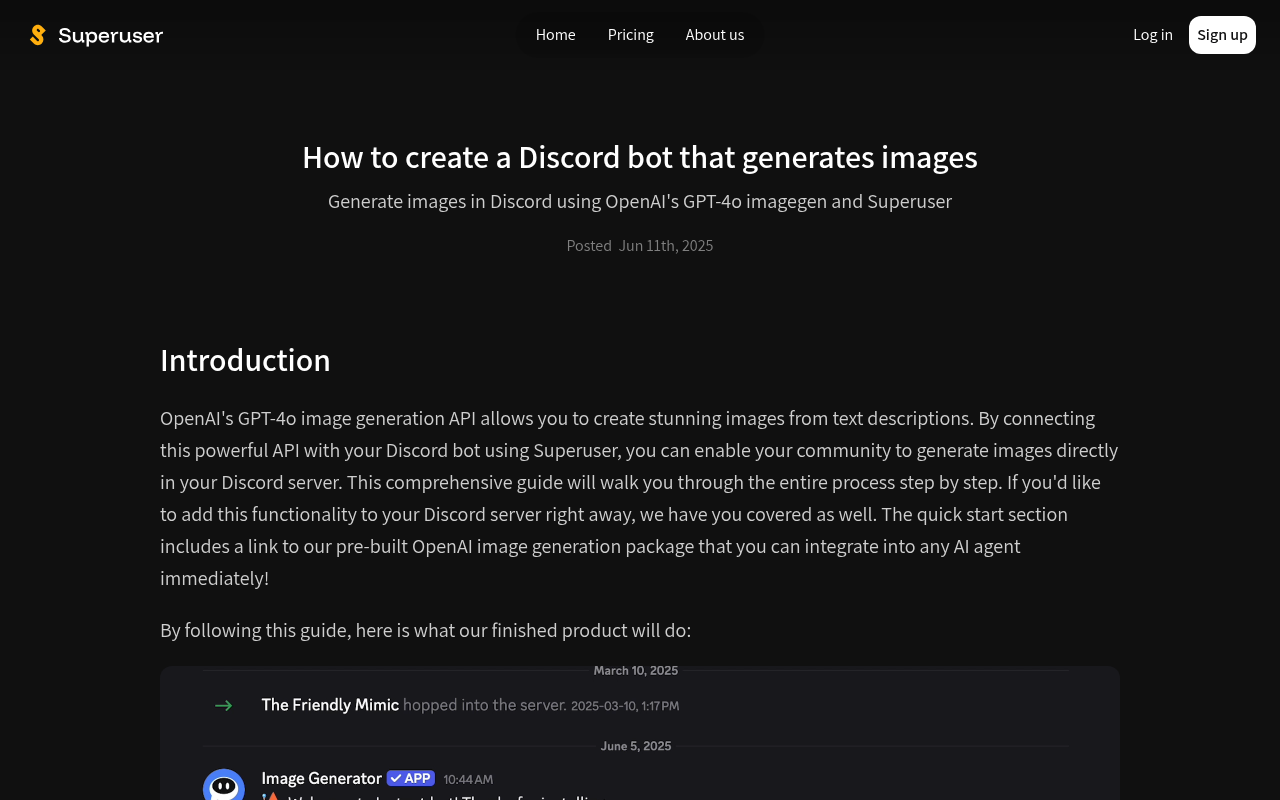
Try it: Open /blog/how-to-create-a-discord-bot-that-generates-images, scroll to the end and hover "Superuser paid plan". The status bar shows http://superuser/pricing.
The pricing FAQ describes an allowance the plan cards never offer
The /pricing plan cards sell "Monthly usage credits", for example "100 credits" or "About 300 advanced tool-using responses". The FAQ directly below says "Each plan includes a set number of smart responses per time window" that switch to quick responses once used up, but no card lists any smart-response allowance. The FAQ also prices separate "compute credits" for tool calls and never says whether these are the same as the cards' usage credits, so a buyer at the pricing step cannot tell what a plan includes.
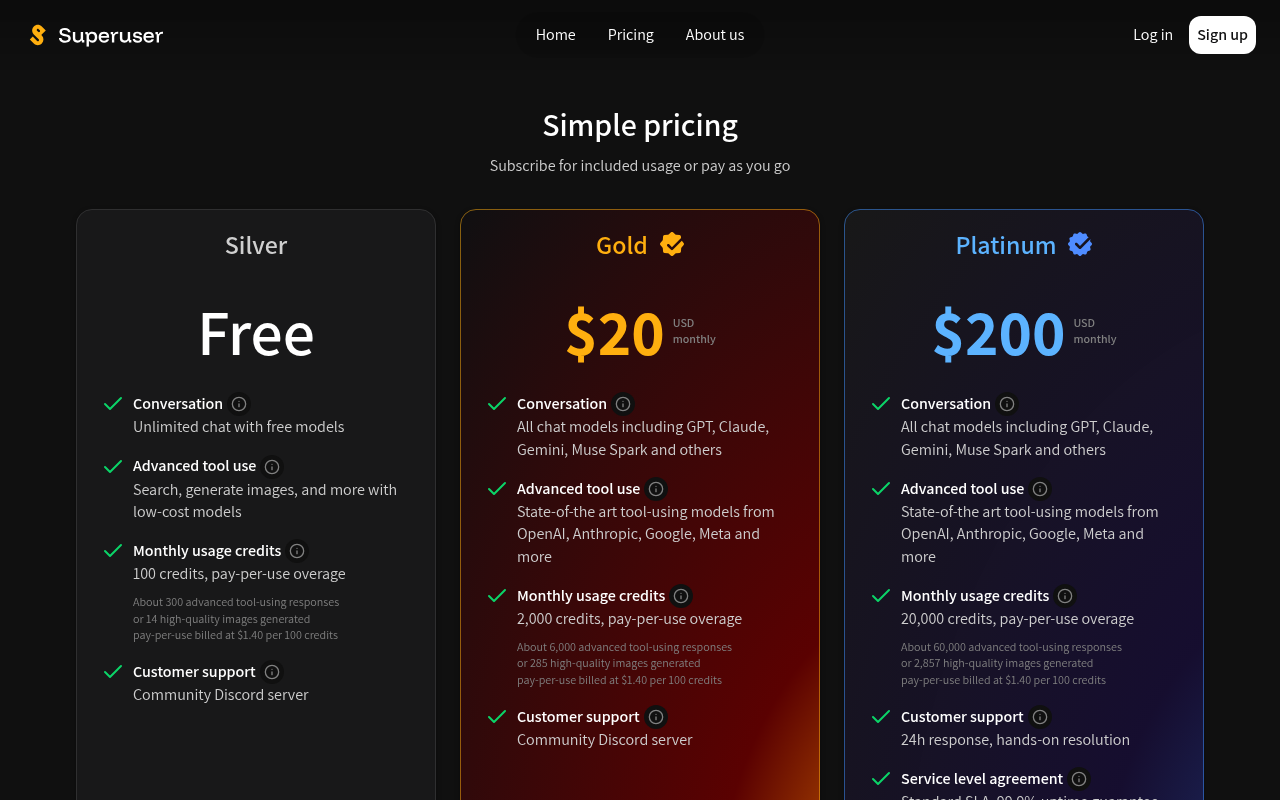
Try it: Open /pricing and read the "Monthly usage credits" line on any plan card. Then scroll to the FAQ and read "What are smart responses?" and "What are compute credits?".
The blog page took 4.3 seconds to show its main content once
On one desktop load, the largest content on /blog took 4.3 seconds to paint. Google treats anything over 4 seconds as poor. A second load came in under that threshold, so the delay is intermittent and only just over the line.
The /blog cover image downloads 795 KB for a 450x200 card
On /blog, the cover image image-gen-with-logo.jpg is 1024x1024 and 795,337 bytes, but it is shown at 450x200 with object-fit cover at a device pixel ratio of 1. The card renders correctly. The extra payload only adds download weight on a page visitors use to judge whether the product is active.
The home page is missing six security header protections
The response from https://superuser.app/ is missing Content-Security-Policy, CSP frame-ancestors or X-Frame-Options, X-Content-Type-Options: nosniff, Referrer-Policy, and Cross-Origin-Resource-Policy. The response combines Access-Control-Allow-Origin: * with credentials.
Plan card credit details on /pricing fall just short of contrast
The grey 12px lines under each plan's monthly credits on /pricing, such as "About 300 advanced tool-using responses" and "pay-per-use billed at $1.40 per 100 credits", are at 4.49:1 contrast (#808080 on #181819). WCAG AA requires 4.5:1. These lines explain what the credits buy, and buyers read them at the pricing step.
Probie fixes this for you.
Stop customers hitting the same friction. Connect your codebase and Probie reproduces these failures, tests the fix, and opens a pull request for your review.
Sign up and get this fixedFree inspection
What should Probie inspect next?
Enter a project URL. There is nothing to install.
Probie checks every issue twice, respects robots.txt, and backs off at bot challenges.
Enter an address and we will email the report card link.