We found 1 issuecosting you truston pinloop.ai.
Watch the inspection.
We navigate your site the way customers would. Idle time is skipped.
How the composite score works
The overall score is a weighted average of the categories: Getting the product 40%, Trust before buying 20%, Mobile 15%, Speed 15%, and Polish and audit 10%. It is never more than 10 points above the Getting the product score, because a product a visitor cannot get cannot score well on anything else, and never more than 25 points above the weakest category, so one badly broken area is not averaged away. Any issue in the main list caps it at 89, so a score above 90 means nothing worth fixing was found.
Each category starts at 100 and stays there when nothing was found in it, whether or not the inspection got that far. Each distinct verified finding deducts 60 points for a serious problem on the path from arriving to paying, 40 for another serious problem, 30, 15 or 8 by high, medium or low severity otherwise, and 4 for an audit finding. Each additional finding below the list takes 2 more points off the overall score, up to 10. Scores stop at zero and round to whole numbers. The formula is fixed and versioned, so the same saved evidence always receives the same score.
The salary step shows only dollars after a visitor picks London
Job seekers in the UK, Europe and other non-US places must guess a dollar figure that Pinloop then uses to filter out jobs, so the product looks built only for US users.
On app.pinloop.ai/start, after a visitor picks "London, United Kingdom" as the place they want to work, the next screen asks "What salary are you after?" and shows only "$70,000, $120,000" on a slider from "$0" to "$300,000+". The screen has no currency choice and no note on whether the amount is converted, yet it says "Pinloop skips jobs that pay less than your minimum." Visitors outside the US meet this during the sign-up questions, on a product that promises "150+ countries".
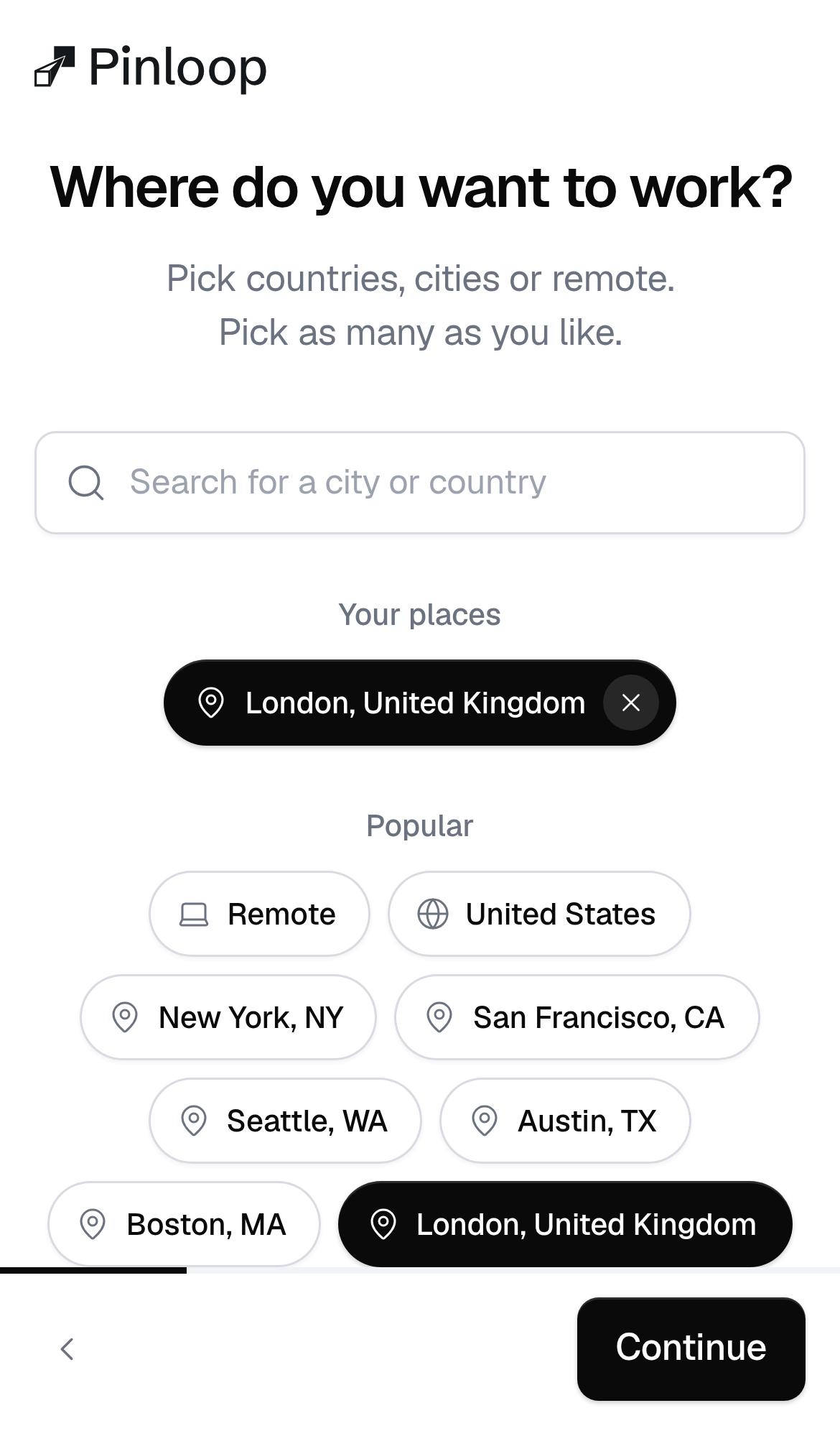
Try it: Open app.pinloop.ai/start and tap Get started. Choose any role, pick "London, United Kingdom" under Popular, tap Continue, and check that the salary step shows only $ amounts with no way to choose a currency.
The plan picked on the pricing page is lost before sign-up
All three Start free trial buttons on /pricing (Starter $19, Pro $39, Max $99) go to the same app.pinloop.ai address with no plan in it. The visitor lands on a second home page headline, "Watch your AI agent apply to jobs. Or don't.", then about 12 question screens, then "Create your account". None of these screens mentions the chosen plan, its price or the 3-day trial. Tapping Start free trial again restarts the questions from the first screen, so a buyer at the signup step has to answer them all again.
The home page head has no canonical URL
The home page at / has no link rel="canonical" in its head. The title, description, Open Graph tags, Twitter card and favicon are all present, and the icon and og:image both load with a 200 status. The missing canonical only affects how search engines combine duplicate URLs, so visitors never see it.
The home page omits the Cross-Origin-Resource-Policy header
The response from https://pinloop.ai/ is missing Cross-Origin-Resource-Policy.
The CLI page's example code comments are low contrast
On /cli, the comment lines in the example terminal, such as "# Search every posting Pinloop holds, best matches first", are #9ca3af on white at 14px. That gives a contrast ratio of 2.53, and WCAG AA requires 4.5:1. The commands themselves and the install instructions are in dark text and stay readable.
Probie fixes this for you.
Stop customers hitting the same friction. Connect your codebase and Probie reproduces these failures, tests the fix, and opens a pull request for your review.
Sign up and get this fixedFree inspection
What should Probie inspect next?
Enter a project URL. There is nothing to install.
Probie checks every issue twice, respects robots.txt, and backs off at bot challenges.
Enter an address and we will email the report card link.