We found 1 issuecosting you truston roastify.tollbooth-dpyc.com.
Watch the inspection.
We navigate your site the way customers would. Idle time is skipped.
How the composite score works
The overall score is a weighted average of the categories: Getting the product 40%, Trust before buying 20%, Mobile 15%, Speed 15%, and Polish and audit 10%. It is never more than 10 points above the Getting the product score, because a product a visitor cannot get cannot score well on anything else, and never more than 25 points above the weakest category, so one badly broken area is not averaged away. Any issue in the main list caps it at 89, so a score above 90 means nothing worth fixing was found.
Each category starts at 100 and stays there when nothing was found in it, whether or not the inspection got that far. Each distinct verified finding deducts 60 points for a serious problem on the path from arriving to paying, 40 for another serious problem, 30, 15 or 8 by high, medium or low severity otherwise, and 4 for an audit finding. Each additional finding below the list takes 2 more points off the overall score, up to 10. Scores stop at zero and round to whole numbers. The formula is fixed and versioned, so the same saved evidence always receives the same score.
The generated nsec stays hidden and cannot be saved
New visitors who create a key on the sign-in card cannot back it up, so clearing browser data or changing device locks them out of their designs.
After "Generate a new key" on the home page sign-in card, the page says "Save this nsec somewhere safe, it's the only copy and it lives only in this browser", but the key field is a password field that shows only dots. The card offers no show, copy or download control, and browsers do not allow copying from a password field. A buyer at the sign-in step cannot follow the warning, so the identity tied to their catalog, designs and balance has no backup.
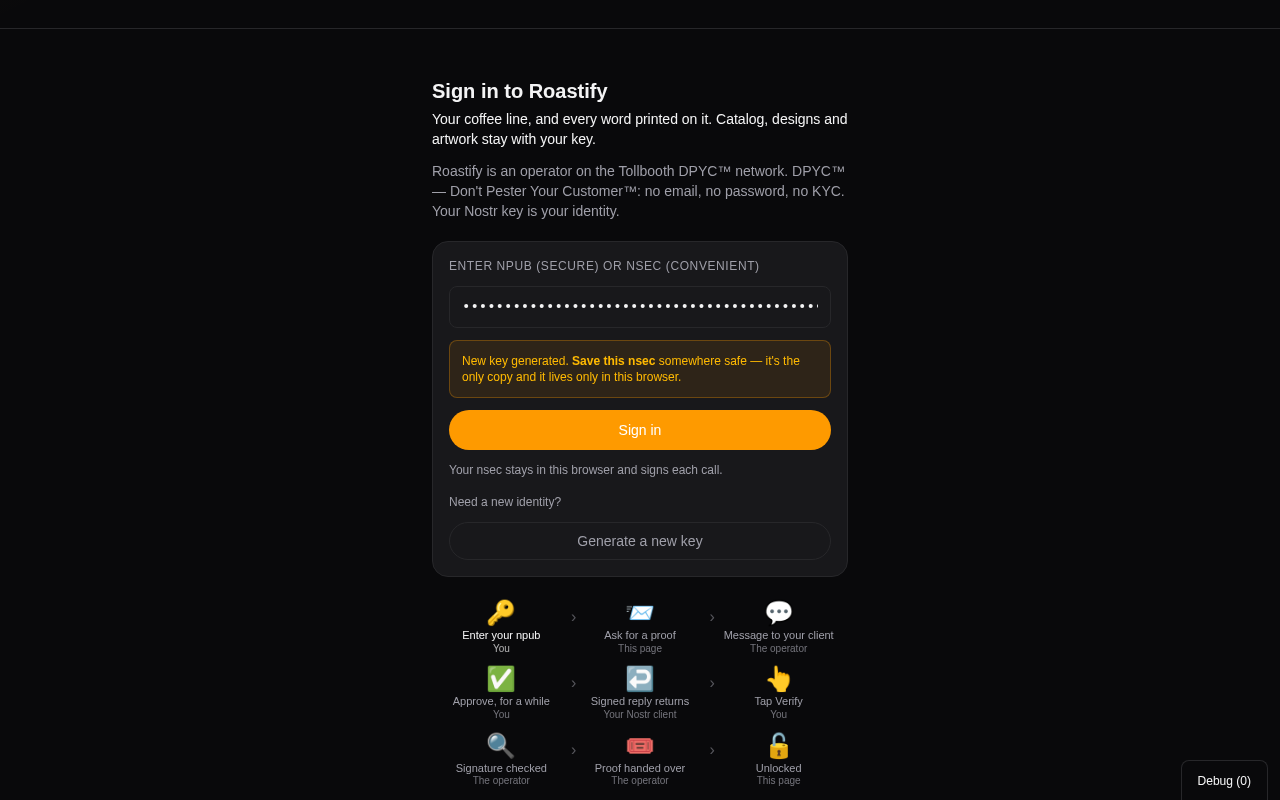
Try it: Open https://roastify.tollbooth-dpyc.com/, scroll to "Sign in to Roastify" and click "Generate a new key". Try to read or copy the nsec from the field.
The home page has no browser icon or canonical URL
The head of the / document has no icon link, and /favicon.ico gives no fallback. It also declares no canonical URL. The title, description, og:image and Twitter card are all present, so link previews still render.
The home page is missing four security headers
The response from https://roastify.tollbooth-dpyc.com/ is missing Strict-Transport-Security, Content-Security-Policy, CSP frame-ancestors or X-Frame-Options, and Cross-Origin-Resource-Policy.
Secondary labels near the sign-in form fall short of contrast minimums
On the home page, the header label "Design Bench" measures 4.12:1 contrast and the 10px step captions "This page" and "The operator" measure 4.17:1, against a 4.5:1 minimum. These are secondary labels around the sign-in steps, and the main sign-in controls are not affected.
The Tollbooth DPYC credit link relies on color alone
On the home page, the "Tollbooth DPYC™" link in the "Powered by" line has no underline. Its amber color reaches only 2.93:1 contrast against the surrounding gray text, and the rule requires at least 3:1. The link points to the network's project and is not part of the sign-in path.
Probie fixes this for you.
Stop customers hitting the same friction. Connect your codebase and Probie reproduces these failures, tests the fix, and opens a pull request for your review.
Sign up and get this fixedFree inspection
What should Probie inspect next?
Enter a project URL. There is nothing to install.
Probie checks every issue twice, respects robots.txt, and backs off at bot challenges.
Enter an address and we will email the report card link.