We found 2 issuescosting you saleson bufferapps.com.
Watch the inspection.
We navigate your site the way customers would. Idle time is skipped.
How the composite score works
The overall score is a weighted average of the categories: Getting the product 40%, Trust before buying 20%, Mobile 15%, Speed 15%, and Polish and audit 10%. It is never more than 10 points above the Getting the product score, because a product a visitor cannot get cannot score well on anything else, and never more than 25 points above the weakest category, so one badly broken area is not averaged away. Any issue in the main list caps it at 89, so a score above 90 means nothing worth fixing was found.
Each category starts at 100 and stays there when nothing was found in it, whether or not the inspection got that far. Each distinct verified finding deducts 60 points for a serious problem on the path from arriving to paying, 40 for another serious problem, 30, 15 or 8 by high, medium or low severity otherwise, and 4 for an audit finding. Each additional finding below the list takes 2 more points off the overall score, up to 10. Scores stop at zero and round to whole numbers. The formula is fixed and versioned, so the same saved evidence always receives the same score.
The Select buttons on all three ad plans do nothing
Makers who choose a $999, $2,499 or $4,499 advertising plan have no way to start paying for it.
On /advertise-with-us, the "Select Growth", "Select Funded" and "Select StartUp" buttons all link to "advertise-with-us#". Clicking one only jumps the page back to the top. No checkout, form or message appears, and no request is made. A maker who is ready to buy a plan reaches a dead end at the pay step, and the only other contact is a "[email protected]" email link offered for custom deals.
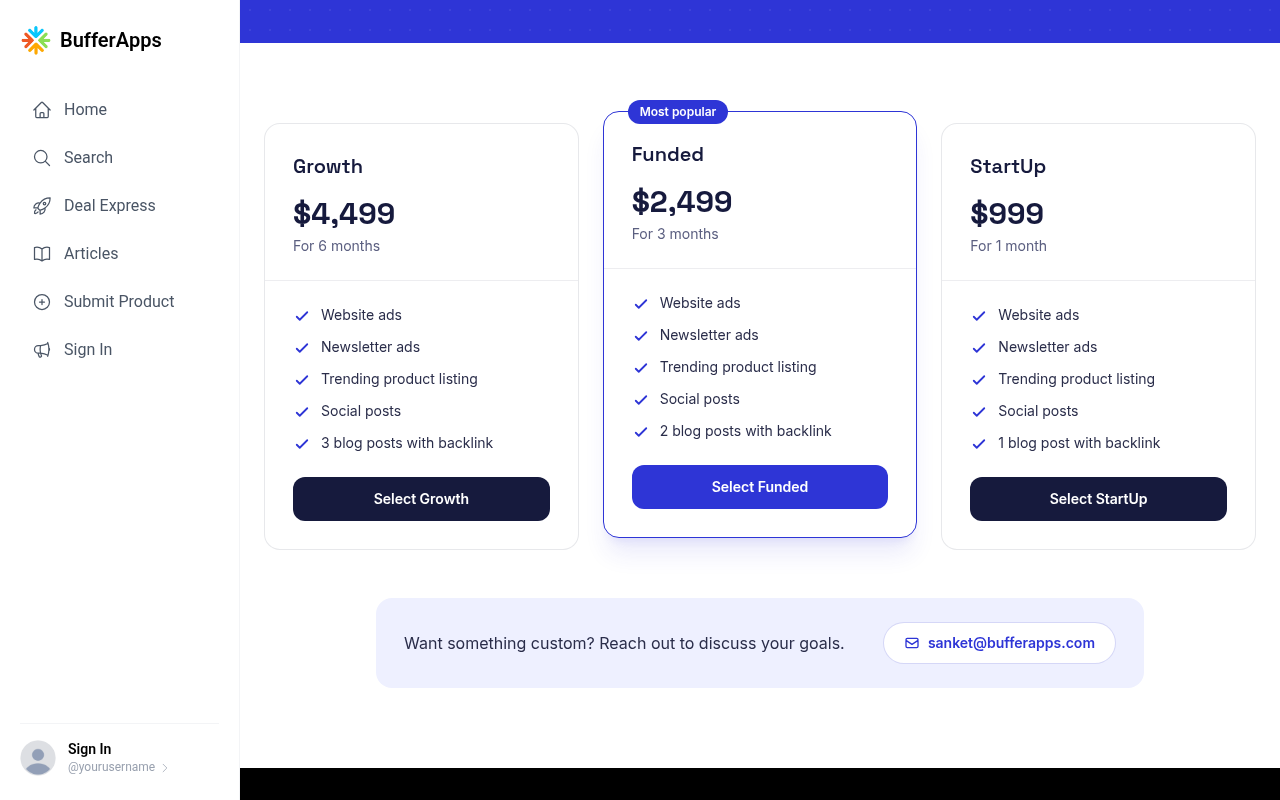
Try it: Open https://bufferapps.com/advertise-with-us, scroll to the plan cards and click "Select Funded". The page scrolls to the top and nothing else happens.
The phone home page shifts its launch list while loading
Phone visitors browsing launches on the home page have the content move under their finger before they scroll or tap.
On a phone, the home page's launch list container moves while the page finishes loading, with a cumulative layout shift of 0.293 measured before any scrolling or tapping. Google rates anything above 0.25 as poor. Makers and buyers meet this as soon as they arrive to find out what BufferApps is, so a tap meant for one launch card can land somewhere else.

Try it: Open / in Chrome DevTools with a 390px wide phone viewport and the Performance panel recording, reload, and check the layout shift score attributed to the launchpad column.
The home page has no Open Graph image or Twitter card type
The head of the home page at / declares og:title and og:description but sets no og:image and no twitter:card. Links to the home page shared on social platforms or in chat apps therefore show a text-only preview with no picture.
The home page is missing six security response headers
The response from https://bufferapps.com/ is missing Strict-Transport-Security, Content-Security-Policy, CSP frame-ancestors or X-Frame-Options, X-Content-Type-Options: nosniff, Referrer-Policy, and Cross-Origin-Resource-Policy.
The listing's close and share icon buttons have no accessible names
On /beta-listing/quest-components, the icon-only close button in the top corner (.top-3 > button) and the share buttons in the publisher panel have no text, aria-label or title. A screen reader announces each one only as "button", so its purpose is not given.
The Quest Components listing image has no alt text
The product image on /beta-listing/quest-components (images.bufferapps.com/Startup/1788497596396_8iLGzgxw.png) is an img with no alt, aria-label or title attribute. Screen reader users reading the listing get no description of what the image shows.
Category tags on launch cards fail the contrast minimum
On the home page and on /beta-listing/quest-components, the 12px gray category tags such as "Productivity" use #99a1af on white. That gives a contrast ratio of 2.6:1, below the 4.5:1 that WCAG AA requires for text this size. The tags are real content that helps visitors sort the launches, so low-vision visitors browsing the directory may find them hard to read.
Probie fixes this for you.
Stop customers hitting the same friction. Connect your codebase and Probie reproduces these failures, tests the fix, and opens a pull request for your review.
Sign up and get this fixedFree inspection
What should Probie inspect next?
Enter a project URL. There is nothing to install.
Probie checks every issue twice, respects robots.txt, and backs off at bot challenges.
Enter an address and we will email the report card link.