We found 2 issuescosting you saleson youcognito.com.
Watch the inspection.
We navigate your site the way customers would. Idle time is skipped.
How the composite score works
The overall score is a weighted average of the categories: Getting the product 40%, Trust before buying 20%, Mobile 15%, Speed 15%, and Polish and audit 10%. It is never more than 10 points above the Getting the product score, because a product a visitor cannot get cannot score well on anything else, and never more than 25 points above the weakest category, so one badly broken area is not averaged away. Any issue in the main list caps it at 89, so a score above 90 means nothing worth fixing was found.
Each category starts at 100 and stays there when nothing was found in it, whether or not the inspection got that far. Each distinct verified finding deducts 60 points for a serious problem on the path from arriving to paying, 40 for another serious problem, 30, 15 or 8 by high, medium or low severity otherwise, and 4 for an audit finding. Each additional finding below the list takes 2 more points off the overall score, up to 10. Scores stop at zero and round to whole numbers. The formula is fixed and versioned, so the same saved evidence always receives the same score.
Verify wallet offers no way to connect outside a wallet browser
Holders who bought 10M YOUCOG but browse in desktop Chrome or phone Safari cannot unlock the Deep Mission they paid for from that tab.
On the home page, pressing "Verify wallet" in the Deep Mission card in desktop Chrome or iPhone Safari shows only "No wallet found. Open Youcognito in a wallet browser or the Base app." The card offers no QR code, no deep link into Coinbase Wallet or the Base app, and no address check. A buyer meets this at the unlock step right after buying the token, and the "Get Coinbase Wallet" link directly below leads to a wallet that has no way back to this tab.
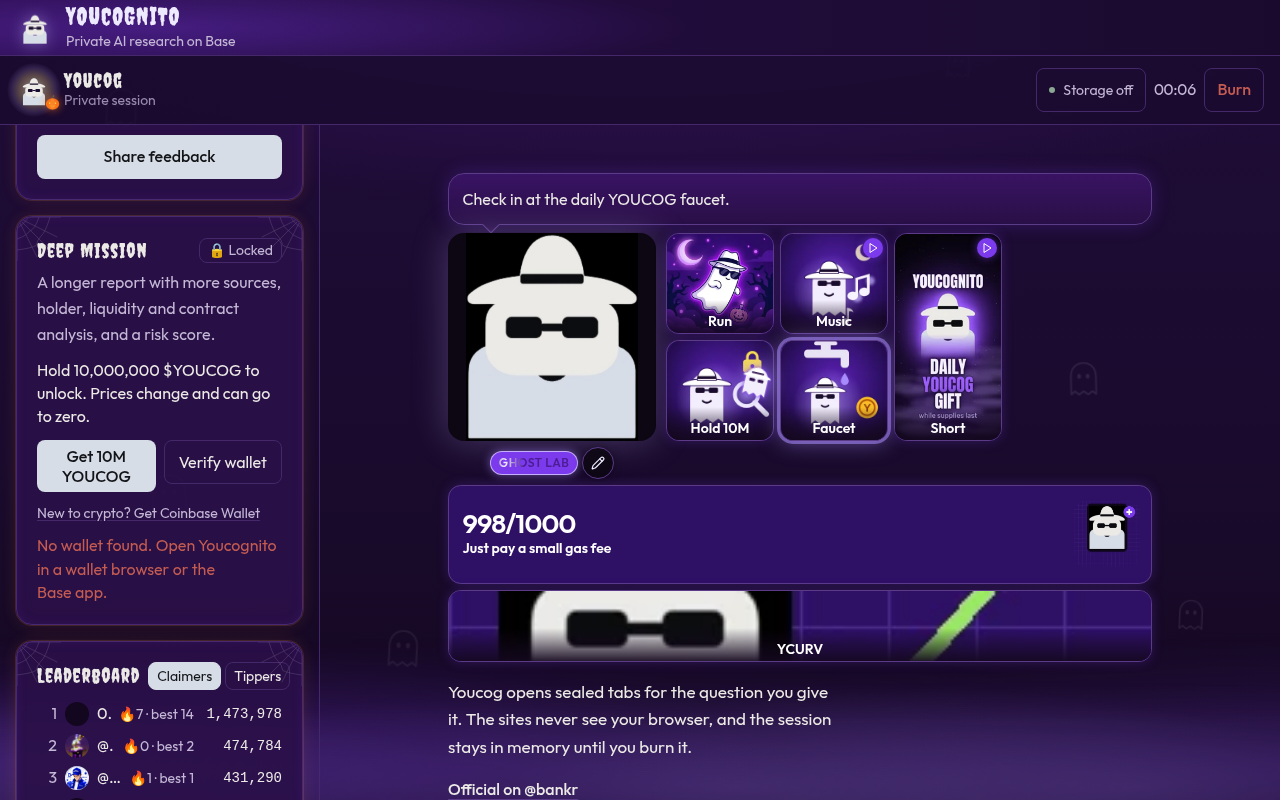
Try it: Open youcognito.com in Safari on an iPhone or in Chrome without a wallet extension, then press "Verify wallet" in the Deep Mission card. Only the "No wallet found" text appears, with no connect option.
The faucet's "bigger" gift is smaller than today's regular gift
Visitors claiming the daily faucet before they buy YOUCOG are asked to listen to a 3:20 track for a reward that looks smaller than the gift they already get.
In the Daily YOUCOG faucet on the home page, the boost box says "Finish Youcognito Theme (Remix) to unlock a bigger faucet gift today (100,000 YOUCOG)". Directly below, the page shows "Today's gift: 215,225 YOUCOG" and a "Claim 215,225 YOUCOG" button. A visitor at the faucet, the step just before buying YOUCOG, cannot tell whether the 100,000 is added to the gift or replaces it, and as written the reward for listening is less than half the regular gift.
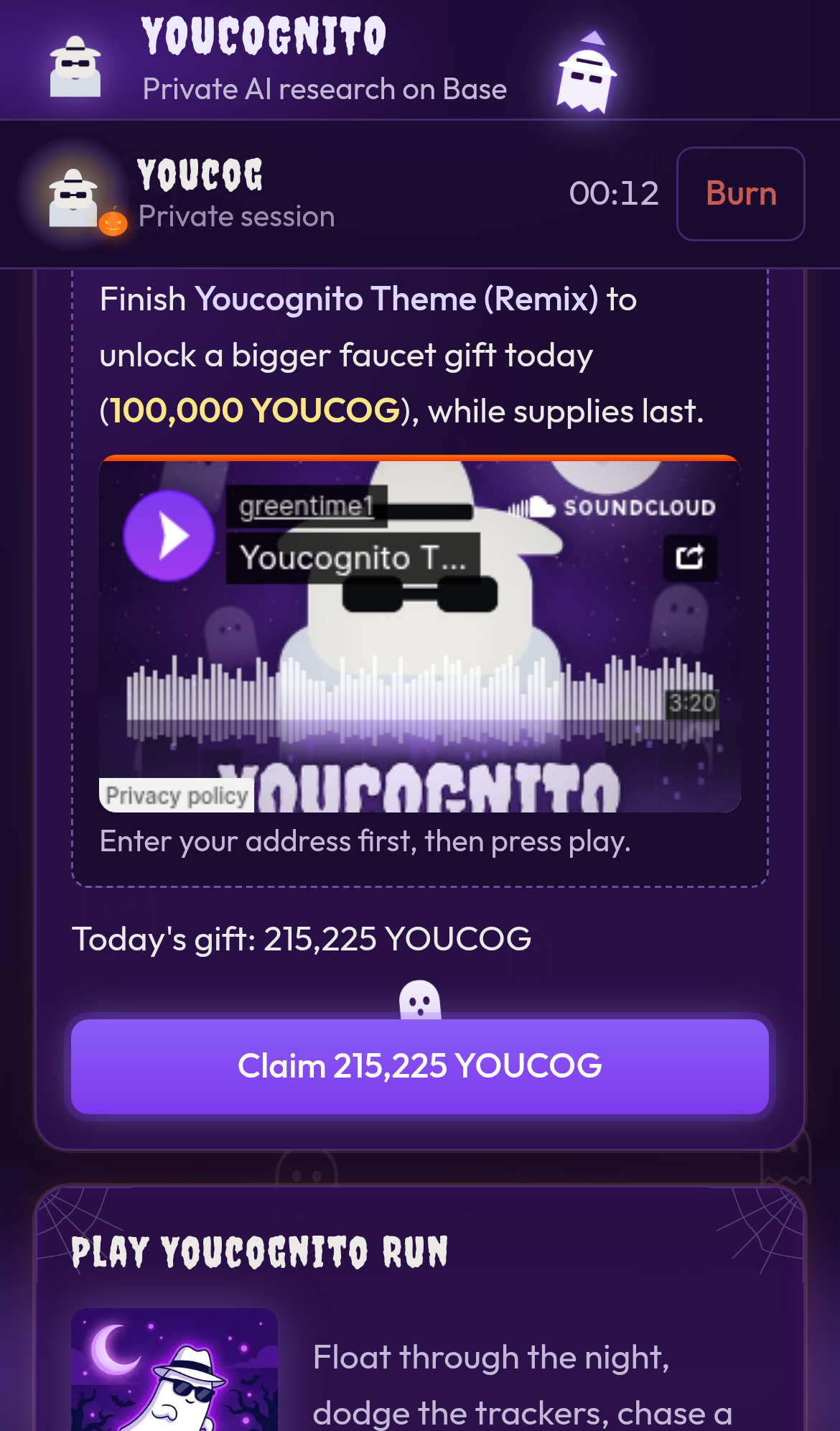
Try it: Open https://youcognito.com/ and open the Daily YOUCOG faucet. Compare "(100,000 YOUCOG)" in the boost box with "Today's gift: 215,225 YOUCOG" just below it.
The /stats page content jumps while the live numbers load
On desktop, the /stats page measured a cumulative layout shift of 0.25 before any scrolling or clicking. Most of that shift came from a stats panel section. That score is at the top of Google's "needs improvement" band (good is 0.1 or below), so the panels move under the reader while a token buyer is checking the live faucet numbers.
The home page is missing three security headers
The response from https://youcognito.com/ is missing Content-Security-Policy, CSP frame-ancestors or X-Frame-Options, and Cross-Origin-Resource-Policy.
The embedded SoundCloud player uses an invalid aria-role attribute
The SoundCloud player embedded on the home page marks its "Youcognito Theme (Remix)" artwork with aria-role="img", which is not a valid ARIA attribute, so assistive technology ignores it. The markup comes from SoundCloud's own iframe, and the research box, faucet and buy links do not depend on it.
An embedded player progress bar uses the invalid role "bar"
On the home page, an element inside an embedded iframe, `<div role="bar" class="progress sc-background-orange">`, uses "bar", which is not a valid ARIA role. Assistive technology cannot announce this progress indicator correctly. The element belongs to the embedded player, not to the research box, the faucet or the buy links.
The embedded SoundCloud share button has an invalid ARIA value
On the home page, the Share button inside the embedded SoundCloud player sets aria-owns="overlay-38", and that value does not point to a valid element. The markup belongs to SoundCloud's widget, not to Youcognito's own research, faucet or buy controls.
Probie fixes this for you.
Stop customers hitting the same friction. Connect your codebase and Probie reproduces these failures, tests the fix, and opens a pull request for your review.
Sign up and get this fixedFree inspection
What should Probie inspect next?
Enter a project URL. There is nothing to install.
Probie checks every issue twice, respects robots.txt, and backs off at bot challenges.
Enter an address and we will email the report card link.