We found 2 issuescosting you truston givee.club.
The raffle anti-bot check shows a reCAPTCHA "Invalid site key" error.
Watch the inspection.
We navigate your site the way customers would. Idle time is skipped.
How the composite score works
The overall score is a weighted average of the categories: Getting the product 40%, Trust before buying 20%, Mobile 15%, Speed 15%, and Polish and audit 10%. It is never more than 10 points above the Getting the product score, because a product a visitor cannot get cannot score well on anything else, and never more than 25 points above the weakest category, so one badly broken area is not averaged away. Any issue in the main list caps it at 89, so a score above 90 means nothing worth fixing was found.
Each category starts at 100 and stays there when nothing was found in it, whether or not the inspection got that far. Each distinct verified finding deducts 60 points for a serious problem on the path from arriving to paying, 40 for another serious problem, 30, 15 or 8 by high, medium or low severity otherwise, and 4 for an audit finding. Each additional finding below the list takes 2 more points off the overall score, up to 10. Scores stop at zero and round to whole numbers. The formula is fixed and versioned, so the same saved evidence always receives the same score.
The raffle anti-bot check shows a reCAPTCHA "Invalid site key" error
Gamers entering a raffle see a Google error addressed to the project owner right when they commit to the giveaway, and it is unclear whether their entry passes the captcha check.
Clicking "Register entry" on a live raffle such as /en/event/1515 or /en/event/1510 opens an "Anti-bot check" dialog where the reCAPTCHA box shows "ERROR for site owner: Invalid site key" and no checkbox. This appears on both desktop and phone at the moment a visitor enters the giveaway, and Google's captcha request returned 401. If the server checks the captcha token, logged-in entries may be rejected, and either way the dialog looks broken.
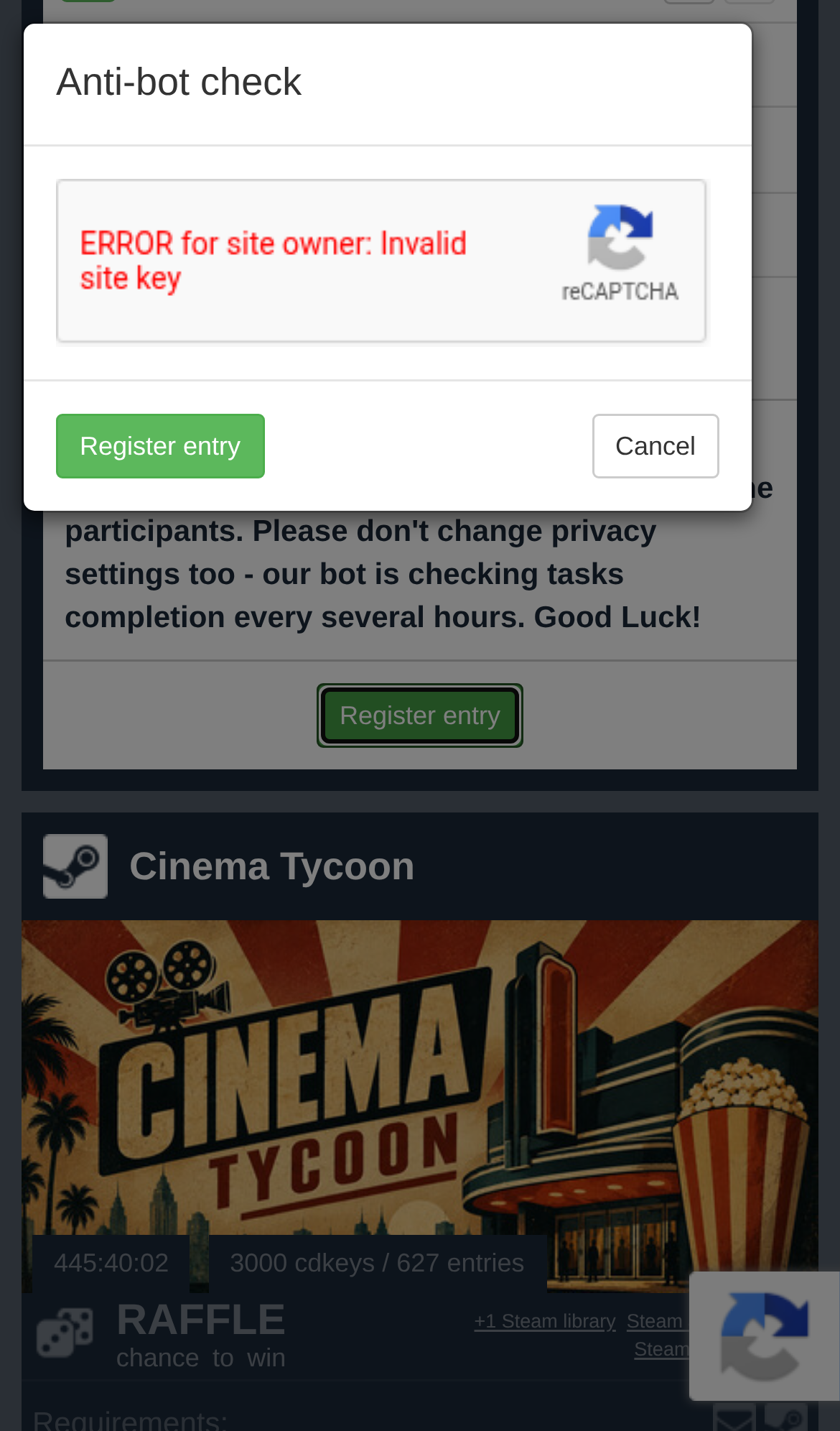
Try it: Open https://givee.club/en/event/1515, scroll to the task list and click the green "Register entry" button. The Anti-bot check dialog shows the red "Invalid site key" error where the captcha should be.
The login page prints stray "?>" code above the form
Gamers sent to log in from a giveaway see leftover code right where they are asked for a password or their Steam account.
The /en/account/auth page shows the text "?>" just under the header and above the "Log in" heading, on desktop and on iPhone. The same page opens for logged-out visitors who click "Register entry" or a task on a giveaway, so they meet the leaked code at the login step. Stray code there can make the page look broken just as visitors decide whether to trust it with their credentials.
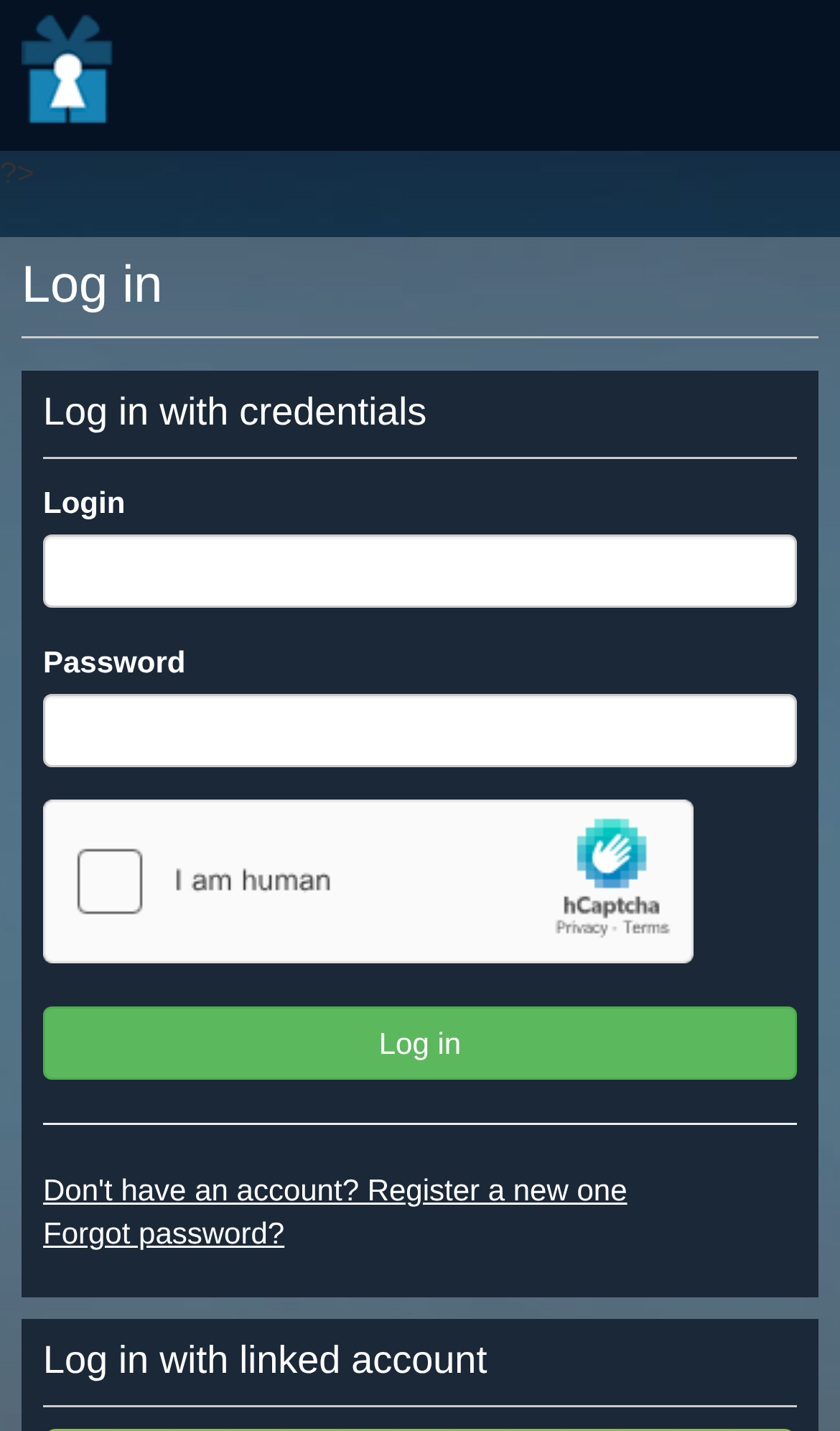
Try it: Open https://givee.club/en/account/auth and look at the top left, just below the header bar. "?>" appears above the "Log in" heading.
The header logo looks soft on high-density phone screens
On /en/account/register, the header logo 210x60-header-en.png is 210x60 pixels and is displayed at 210x60 CSS pixels on a phone screen with a device pixel ratio of 3. That means it is upscaled threefold, so its edges look soft. The signup form below it renders and works normally.
The /en home page has no meta description or Twitter card tag
The /en page head has no meta description and no twitter:card tag. The title, Open Graph description, Open Graph image, canonical link and favicon are all present and load correctly, so most link previews still have content to show.
The signup fields give browsers no autofill hints
The Login, Password and Email fields on /en/account/register have no autocomplete attribute, so the browser gets no hint that they hold a new username, a new password and an email. Phone visitors at the signup step may get no autofill or password-manager suggestions. The form itself renders and the Email field already uses type="email".
The giveaway list page lacks four security headers
The response from https://givee.club/en is missing Strict-Transport-Security, Content-Security-Policy, Referrer-Policy, and Cross-Origin-Resource-Policy.
The giveaway list loads Bootstrap 3.4.1, a known-vulnerable version
The /en giveaway list loads /assets/vendor/bootstrap-3.4.1-dist/js/bootstrap.min.js. Bootstrap 3.4.1 is a known-vulnerable version listed under CVE-2024-6485 and CVE-2025-1647, both cross-project scripting issues, and Bootstrap 3 is end-of-life. Whether either advisory applies depends on how the page uses Bootstrap's data attributes and components.
The giveaway list loads jQuery 2.1.0, a known-vulnerable version
The /en page loads jQuery 2.1.0 from /assets/vendor/jquery/jquery.min.js. That version is listed under CVE-2015-9251 and CVE-2019-11358 and is past end of life. Whether those advisories can be reached depends on how the page uses the library.
Giveaway card images on /en have no alt text
The cover images on the giveaway cards on /en, for example the one in the /event/1515 card, are img elements with no alt attribute. The game title appears as text in the same card link, so the giveaway can still be identified, but some screen readers may read out the hashed image file name.
Giveaway timers and entry counts have low-contrast grey text
On /en, the raffle countdowns such as "445:45:04" and entry counts such as "3000 cdkeys / 619 entries" use #767e88 text on #1b2838 at 12px. That gives a contrast ratio of 3.63:1, below the 4.5:1 that WCAG AA requires for text this size. These labels are what a visitor uses to judge whether a raffle is live and worth entering.
Probie fixes this for you.
Stop customers hitting the same friction. Connect your codebase and Probie reproduces these failures, tests the fix, and opens a pull request for your review.
Sign up and get this fixedFree inspection
What should Probie inspect next?
Enter a project URL. There is nothing to install.
Probie checks every issue twice, respects robots.txt, and backs off at bot challenges.
Enter an address and we will email the report card link.