We found 3 issuescosting you truston lonare.com.
The book-a-call page shows a cloud consultancy's case study and testimonial.
Watch the inspection.
We navigate your site the way customers would. Idle time is skipped.
How the composite score works
The overall score is a weighted average of the categories: Getting the product 40%, Trust before buying 20%, Mobile 15%, Speed 15%, and Polish and audit 10%. It is never more than 10 points above the Getting the product score, because a product a visitor cannot get cannot score well on anything else, and never more than 25 points above the weakest category, so one badly broken area is not averaged away. Any issue in the main list caps it at 89, so a score above 90 means nothing worth fixing was found.
Each category starts at 100 and stays there when nothing was found in it, whether or not the inspection got that far. Each distinct verified finding deducts 60 points for a serious problem on the path from arriving to paying, 40 for another serious problem, 30, 15 or 8 by high, medium or low severity otherwise, and 4 for an audit finding. Each additional finding below the list takes 2 more points off the overall score, up to 10. Scores stop at zero and round to whole numbers. The formula is fixed and versioned, so the same saved evidence always receives the same score.
The book-a-call page shows a cloud consultancy's case study and testimonial
Applicants about to book the fit call for a coaching programme see proof from an unrelated cloud architecture business instead.
On /book-a-call, the panel next to the booking form reads "Recent work: Admiral. From 40 million unsorted documents to a classifier the audit team trusts," and the only testimonial reads "The Well-Architected review found single points of failure in our payment path, each with a costed fix." The browser tab title is "Book a Discovery Call | Cloud Solutions Architect". Applicants meet this at the call-booking step just before paying for the coaching programme, and nothing on the page mentions coaching.
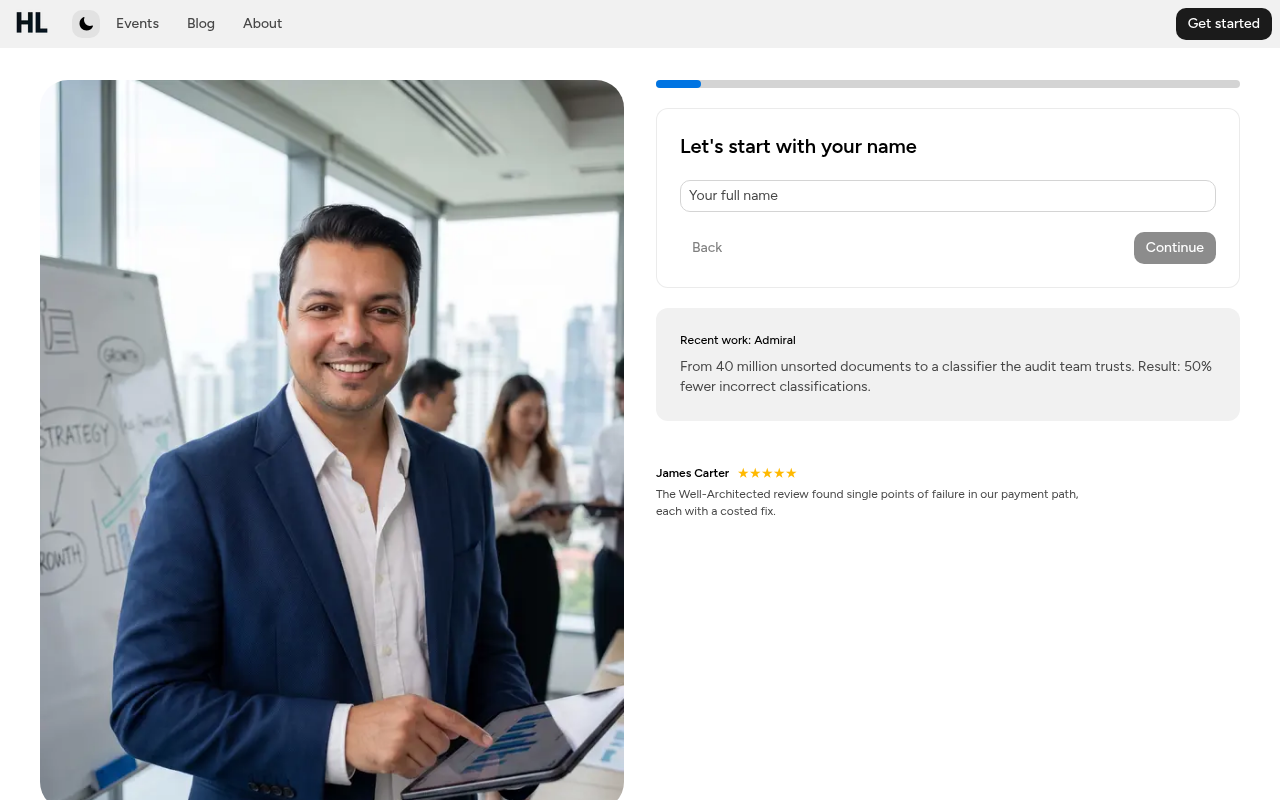
Try it: Open https://lonare.com/book-a-call and read the tab title, the grey "Recent work" panel and the testimonial under it.
Blog post summaries show copywriting notes instead of excerpts
Prospective clients who read the blog to judge the coach see notes about sales tactics where they expected a personal summary of each post.
On /blog, six of the coach's own posts have summaries that read like notes from a copywriting brief. Examples include "Addressing the unspoken fear directly: this is additive, not a replacement decision yet.", "A simple, low-pressure invitation: who I help and how, no hard sell." and "The guarantee, stated plainly: one of the strongest, most differentiated offers here." The Blog link is in the header of every page, so a visitor checking the coach's credibility before applying reads these notes.

Try it: Open https://lonare.com/blog and scroll to the posts dated 9/24/2026 through 7/17/2026. Read the summary text under each title.
The cost FAQ points to a pricing section that shows no price
Visitors weighing a multi-thousand-pound programme cannot learn even a price range until they have handed over their contact details in the application.
On the home page, the FAQ "What does the programme cost and what's included?" answers "See the pricing section for current details." The programme card it points to lists features and a "Replace your salary" button but no price or range. The first figure, "Programs like this typically range from £3,000 to £12,000+", appears at step 7 of the 14-step /apply form, after the visitor has given their name, email, WhatsApp number and income.
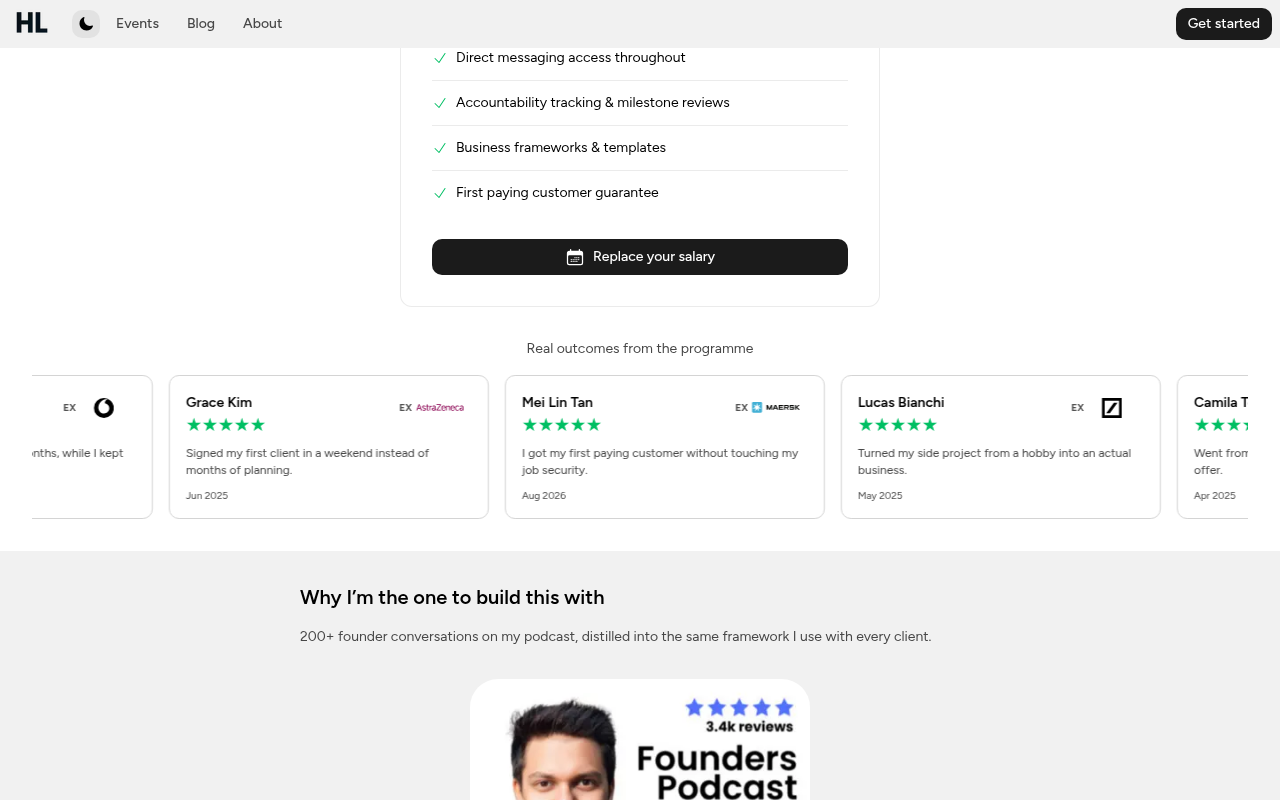
Try it: Open https://lonare.com/, expand the FAQ "What does the programme cost and what's included?", then scroll to the programme card above "Real outcomes from the programme" and look for a price.
The application name field has no autofill hint
On /apply, the first step's field labelled "Let's start with your name" has no autocomplete attribute and no name attribute. Browsers may not offer a saved full name there, so applicants type it themselves at the start of the application.
The booking form's name field has no autofill hint
The first field of the /book-a-call form, labelled "Let's start with your name", has no autocomplete attribute and an empty name attribute. That means the browser has no clear signal to offer the visitor's saved name. Applicants meet this at the start of booking the fit call. It adds a little typing but does not stop the booking.
The home page response is missing six security headers
The response from https://lonare.com/ is missing Strict-Transport-Security, Content-Security-Policy, CSP frame-ancestors or X-Frame-Options, X-Content-Type-Options: nosniff, Referrer-Policy, and Cross-Origin-Resource-Policy.
Probie fixes this for you.
Stop customers hitting the same friction. Connect your codebase and Probie reproduces these failures, tests the fix, and opens a pull request for your review.
Sign up and get this fixedFree inspection
What should Probie inspect next?
Enter a project URL. There is nothing to install.
Probie checks every issue twice, respects robots.txt, and backs off at bot challenges.
Enter an address and we will email the report card link.