We found 3 issuescosting you truston the90fc.com.
The web app shows every score on first open despite the hidden-by-default claim.
Watch the inspection.
We navigate your site the way customers would. Idle time is skipped.
How the composite score works
The overall score is a weighted average of the categories: Getting the product 40%, Trust before buying 20%, Mobile 15%, Speed 15%, and Polish and audit 10%. It is never more than 10 points above the Getting the product score, because a product a visitor cannot get cannot score well on anything else, and never more than 25 points above the weakest category, so one badly broken area is not averaged away. Any issue in the main list caps it at 89, so a score above 90 means nothing worth fixing was found.
Each category starts at 100 and stays there when nothing was found in it, whether or not the inspection got that far. Each distinct verified finding deducts 60 points for a serious problem on the path from arriving to paying, 40 for another serious problem, 30, 15 or 8 by high, medium or low severity otherwise, and 4 for an audit finding. Each additional finding below the list takes 2 more points off the overall score, up to 10. Scores stop at zero and round to whole numbers. The formula is fixed and versioned, so the same saved evidence always receives the same score.
The web app shows every score on first open despite the hidden-by-default claim
Fans who come to Ninety to avoid a result they recorded see that result as soon as they open Matches on the web.
The home page says "Scores stay hidden until you choose to see them." The features page says "the first time you open it, every recent score is covered". In the web app opened from "Use it on the web", Matches for Sat 21 (the day before today) shows every full-time score uncovered, for example Chelsea 1 Leeds 4, and Settings > Spoilers already has "Show all: Every score shows." selected. Fans meet this the first time they try the product, which is where the main promise should hold.
Try it: In a fresh private window, open https://the90fc.com/, click "Use it on the web", open Matches and pick yesterday's date. Every final score is visible, and Settings > Spoilers shows "Show all" selected.
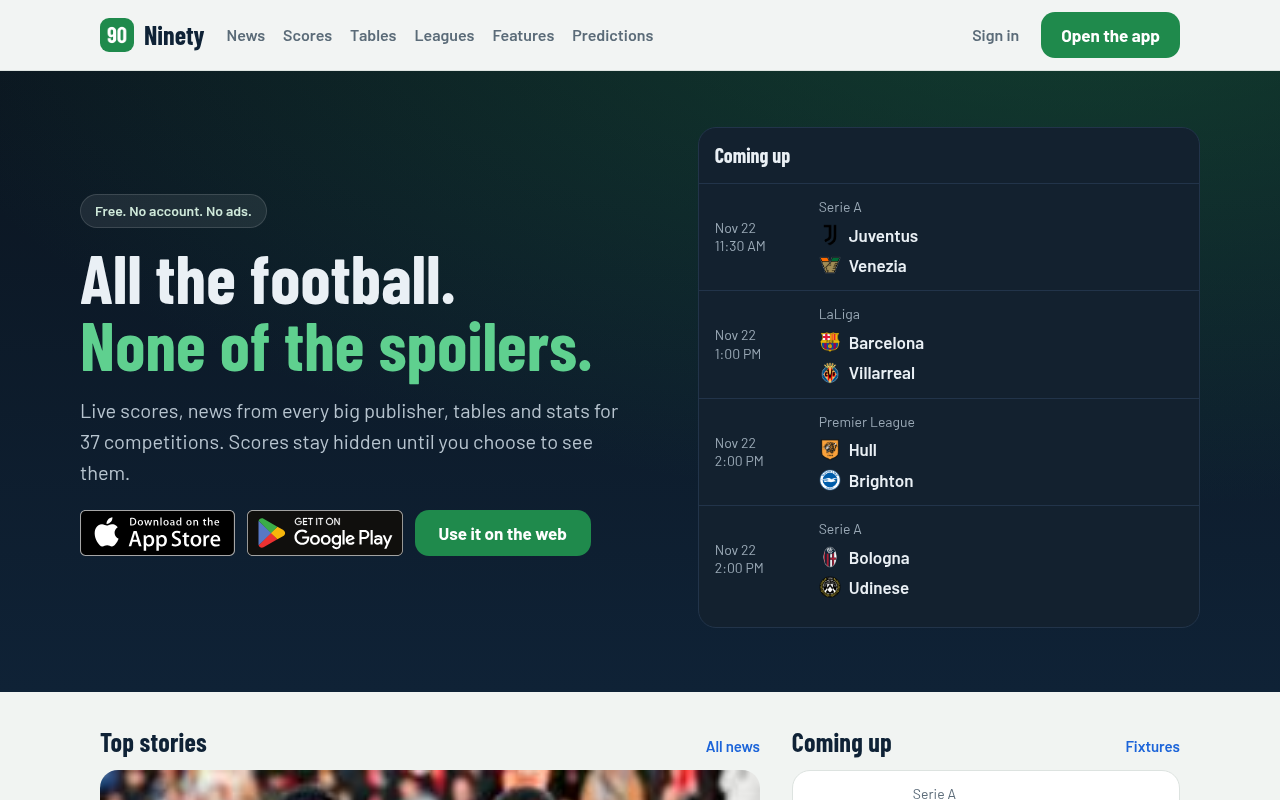
The home page spoils recent results right under "None of the spoilers."
Fans who record matches or watch on delay see the scores the product promises to hide before they ever install or open the app.
The hero on the home page promises "None of the spoilers." and "Scores stay hidden until you choose to see them." The "Top stories" section just below shows uncovered result headlines such as "Noah Okafor stars as Leeds hammer Chelsea 4-1 at Stamford Bridge" and "Noni Madueke rescues a point for Arsenal against Newcastle in thrilling 2-2 draw", both marked 5h ago. The spoiler-free feature page says headlines like these are "folded away with a 'Show' button", and its "See today's matches, spoilers covered on the web" link leads back to this same uncovered home page.
Try it: Open https://the90fc.com/ on a phone or desktop and scroll to "Top stories". Recent match scores show in the headlines with no cover or "Show" button.
The download page and App Store list different minimum iOS versions
Under Requirements, the /download page says "iPhone: iOS 16.1 or later for lock screen Live Activities." The App Store listing that the page's own badge opens says "Requires iOS 16.4 or later." A buyer at the download step can rely on the page's version and then hit the higher requirement only when they try to install.
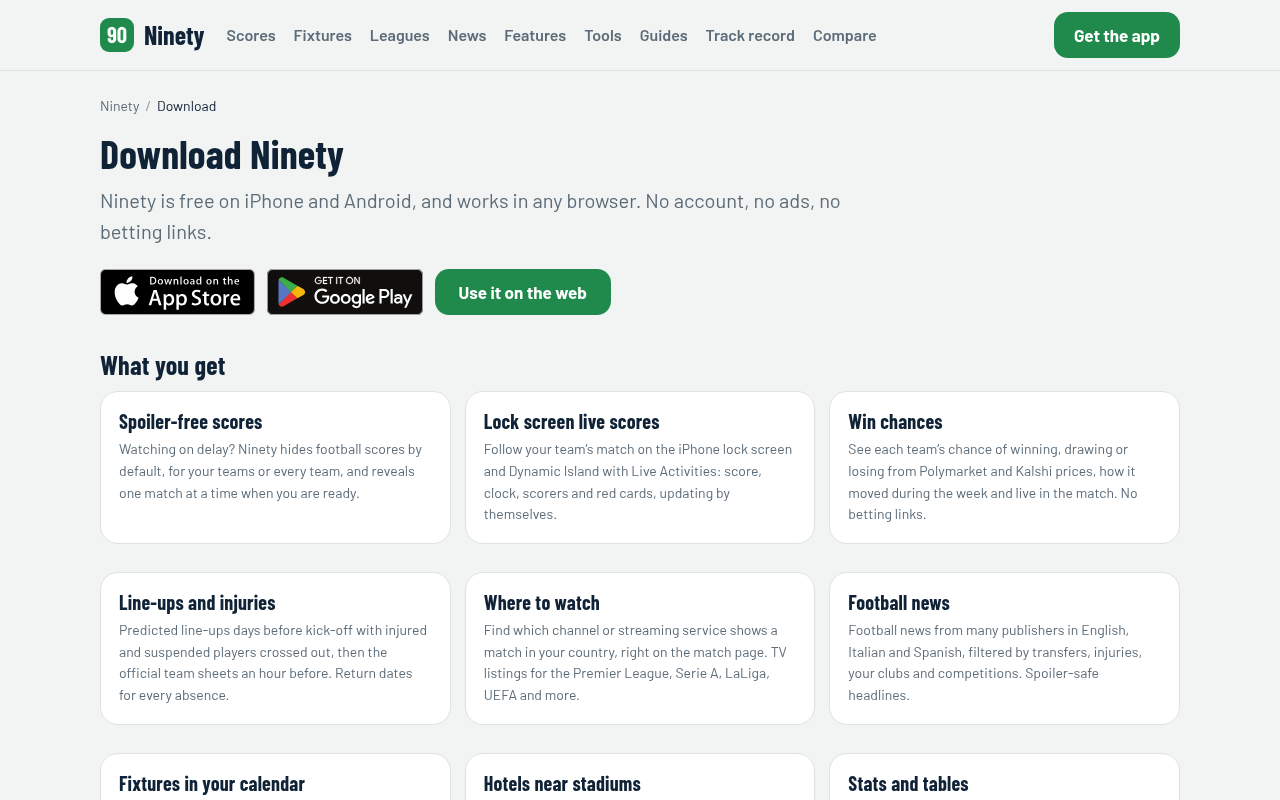
Try it: Open https://the90fc.com/download and read the Requirements line for iPhone. Then tap the App Store badge and compare it with the "Requires iOS" line on the listing.
The Predictions nav link is cut off to "Pr" on phones
At 390px wide, the header nav on the home page cuts the last link off after "Pr". When "Predictions" has keyboard focus, its right half is still outside the viewport and the hit points that are on screen land on the header bar instead of the link. The main calls to action are unaffected.
Focused match rows stay hidden under the app banner and bottom nav
On /matches at phone width, the "2:00 PM Hull Brighton" and "4:30 PM Liverpool Man Utd" match buttons are covered by the fixed "Ninety on your phone" banner and the bottom navigation while they have focus. At every point tested inside both buttons, the element on top was the overlay and not the button, and this happened again on a second load. A fan moving through fixtures by keyboard cannot see these rows when focus reaches them.
The home page is missing six security response headers
The response from https://the90fc.com/ is missing Strict-Transport-Security, Content-Security-Policy, CSP frame-ancestors or X-Frame-Options, X-Content-Type-Options: nosniff, Referrer-Policy, and Cross-Origin-Resource-Policy.
The green app buttons fall just short of the contrast minimum
On the home page, the white labels on the green "Open the app" and "Use it on the web" buttons measure a contrast ratio of 4.37:1 (#ffffff on #1f8a4c). The WCAG AA minimum for 17px bold text is 4.5:1. The labels stay readable, but they fall just under the standard on the main buttons that open the app.
Probie fixes this for you.
Stop customers hitting the same friction. Connect your codebase and Probie reproduces these failures, tests the fix, and opens a pull request for your review.
Sign up and get this fixedFree inspection
What should Probie inspect next?
Enter a project URL. There is nothing to install.
Probie checks every issue twice, respects robots.txt, and backs off at bot challenges.
Enter an address and we will email the report card link.