We found 3 issuescosting you truston apps.odoo.com.
Watch the inspection.
We navigate your site the way customers would. Idle time is skipped.
How the composite score works
The overall score is a weighted average of the categories: Getting the product 40%, Trust before buying 20%, Mobile 15%, Speed 15%, and Polish and audit 10%. It is never more than 10 points above the Getting the product score, because a product a visitor cannot get cannot score well on anything else, and never more than 25 points above the weakest category, so one badly broken area is not averaged away. Any issue in the main list caps it at 89, so a score above 90 means nothing worth fixing was found.
Each category starts at 100 and stays there when nothing was found in it, whether or not the inspection got that far. Each distinct verified finding deducts 60 points for a serious problem on the path from arriving to paying, 40 for another serious problem, 30, 15 or 8 by high, medium or low severity otherwise, and 4 for an audit finding. Each additional finding below the list takes 2 more points off the overall score, up to 10. Scores stop at zero and round to whole numbers. The formula is fixed and versioned, so the same saved evidence always receives the same score.
The cart adds 21% "TVA" to an app listed at $ 606.75
Guest buyers see the cart total jump from the listed price to a higher figure, with a French tax label, before they have given a country.
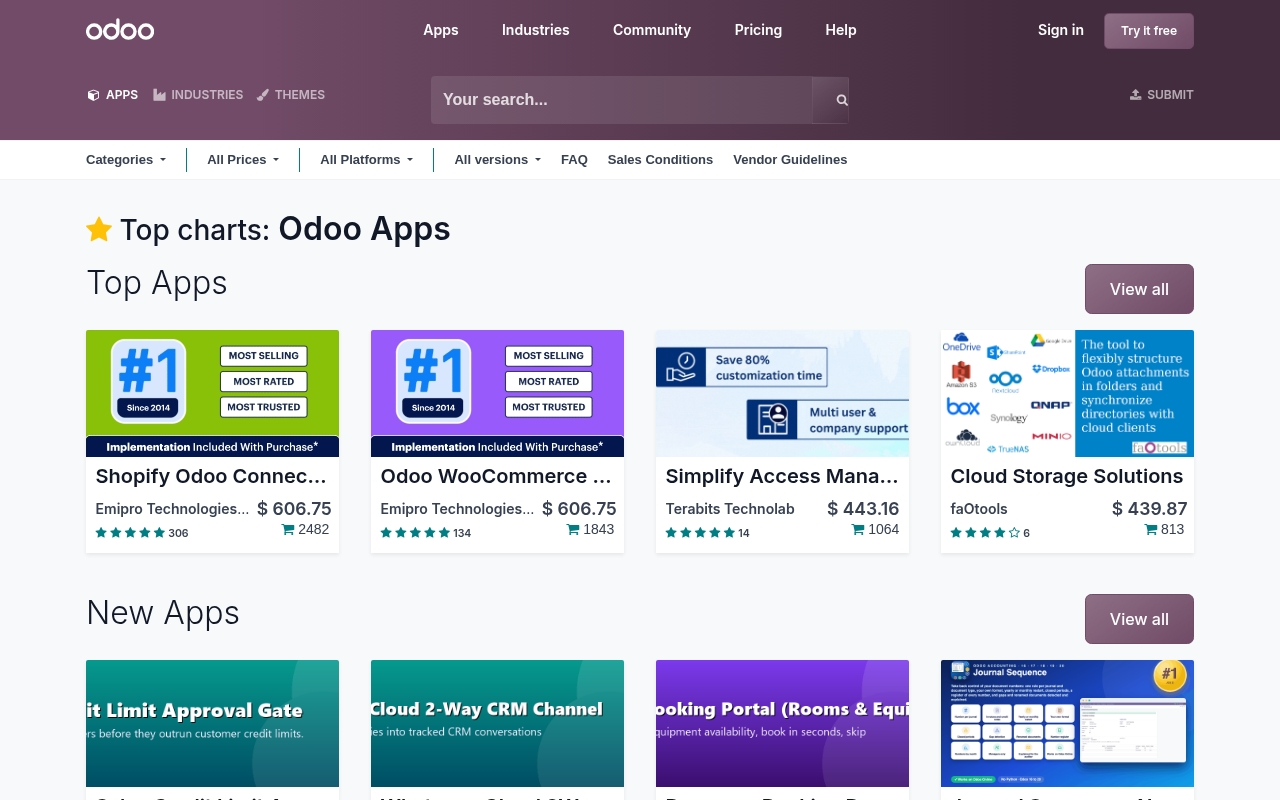
The app grid lists Shopify Odoo Connector at "$ 606.75", but the cart shows "Subtotal US$ 606.75", "TVA 21% US$ 127.42" and "Total US$ 734.17" before the visitor has entered an address or logged in. The same TVA line appears on the checkout address step next to "Please login to purchase from Odoo Apps", and the listing does not say that prices exclude tax. Buyers outside Belgium meet an unexplained 21% surcharge in French on an English page at the step where they decide to pay.
Try it: Open apps.odoo.com/apps/modules/20.0/shopify_ept in a logged-out browser and click Add to Cart. On /shop/cart, compare the "TVA 21%" line and the total with the $ 606.75 list price.
The checkout "Confirm" button does nothing for signed-out buyers
Buyers who reach checkout without signing in press the main button under a US$ 734.17 total and get no response.
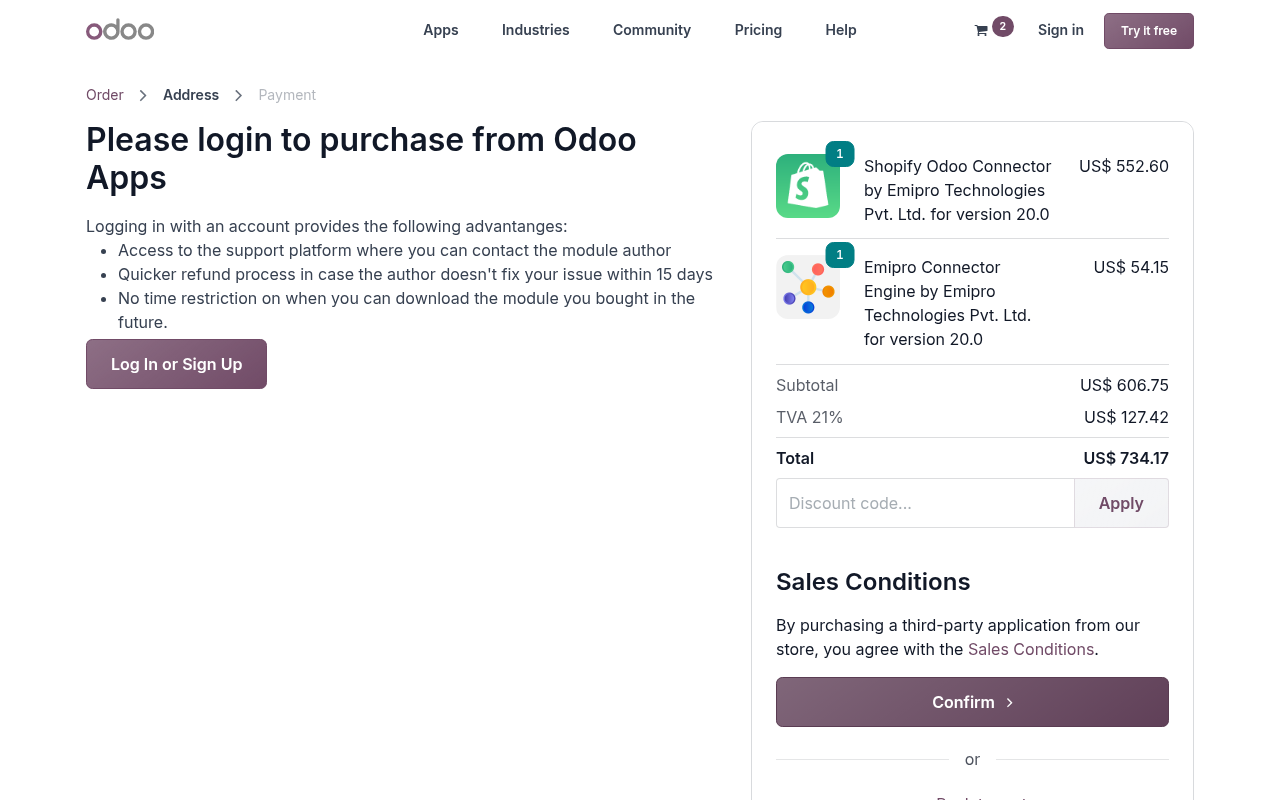
On /shop/address, a buyer who is not signed in sees an enabled, full-width "Confirm" button under the order total and Sales Conditions. Clicking it produced no page change, no message, no redirect to login and no network request. This is the step right before payment, and every first-time buyer meets it signed out. The only control that works is "Log In or Sign Up" in the other column.
Try it: While signed out, add a paid app such as /apps/modules/20.0/shopify_ept to the cart, click Checkout, then click "Confirm" on /shop/address. Nothing happens.
A paid app promises Odoo Online support the Sales Conditions rule out
Odoo Online customers who buy this $ 9.95 app because its page says it runs on Online agree at checkout to terms that say it cannot be installed there or refunded.
The third-party app "Journal Sequence" on /apps/modules/20.0/ng_journal_sequence sells for $ 9.95 and its page says "No Python: it installs on Odoo Online" and "Runs on : Odoo Online Odoo.sh On-premise". The Sales Conditions linked from the cart say "Third-party applications can NOT be installed on Online (SaaS) databases", and the refund policy excludes databases hosted on Odoo Online. A buyer on Online meets these two answers when they reach checkout, and the store's own Odoo Online platform filter does not list the app.
Try it: Open /apps/modules/20.0/ng_journal_sequence and read the "Runs on" line, then open /apps/sales-conditions and read the paragraph that says third-party apps cannot be installed on Online databases.
The About us page shows a broken "Our Team" image
On /aboutus the team photo, business_conference.jpg from apps.odoocdn.com, fails to load with net::ERR_BLOCKED_BY_ORB. The page shows a broken image icon and the alt text "Our Team" beside the company statement. This happens on both desktop and phone.
The /apps page has no meta description or og:description
The head of the /apps document has no meta description and no og:description tag. The title, og:title, og:image, canonical and favicon are all present and resolve. Without the two description tags, search engines and link previews make up their own summary text for the store's main page.
The /apps page is missing six security header and cookie protections
The response from https://apps.odoo.com/apps is missing Strict-Transport-Security, Content-Security-Policy, CSP frame-ancestors or X-Frame-Options, X-Content-Type-Options: nosniff, and Cross-Origin-Resource-Policy. session_id lack Secure or HttpOnly.
The store search button has no accessible name
The magnifier submit button beside "Your search..." on /apps contains only an icon, `<i class="fa fa-search">`, and has no text, aria-label or title. Screen readers announce it as an unnamed button, so assistive technology users have to guess what it does while they search the store.
Inline links on the vendor guidelines page rely on color alone
Inline links on /apps/vendor-guidelines, including "developer documentation", "here" and "Odoo Enterprise Subscription Agreement", have no underline. Their color (#714b67) contrasts only 1.42:1 with the surrounding text (#374151), and the minimum is 3:1. Vendors who cannot tell the colors apart may not notice that the links exist.
The footer social icon links have no accessible names
The Facebook, Twitter and LinkedIn links in the footer of /apps, /aboutus and /apps/vendor-guidelines contain only an icon element and have no text or aria-label. Screen reader users hear an unnamed link for each one.
Probie fixes this for you.
Stop customers hitting the same friction. Connect your codebase and Probie reproduces these failures, tests the fix, and opens a pull request for your review.
Sign up and get this fixedFree inspection
What should Probie inspect next?
Enter a project URL. There is nothing to install.
Probie checks every issue twice, respects robots.txt, and backs off at bot challenges.
Enter an address and we will email the report card link.