We found 4 issuescosting you truston screensmooth.com.
Checkout calls the $79 price an early bird discount the page does not.
Watch the inspection.
We navigate your site the way customers would. Idle time is skipped.
How the composite score works
The overall score is a weighted average of the categories: Getting the product 40%, Trust before buying 20%, Mobile 15%, Speed 15%, and Polish and audit 10%. It is never more than 10 points above the Getting the product score, because a product a visitor cannot get cannot score well on anything else, and never more than 25 points above the weakest category, so one badly broken area is not averaged away. Any issue in the main list caps it at 89, so a score above 90 means nothing worth fixing was found.
Each category starts at 100 and stays there when nothing was found in it, whether or not the inspection got that far. Each distinct verified finding deducts 60 points for a serious problem on the path from arriving to paying, 40 for another serious problem, 30, 15 or 8 by high, medium or low severity otherwise, and 4 for an audit finding. Each additional finding below the list takes 2 more points off the overall score, up to 10. Scores stop at zero and round to whole numbers. The formula is fixed and versioned, so the same saved evidence always receives the same score.
Checkout calls the $79 price an early bird discount the page does not
Buyers about to pay see a price history that changes between the ladder, the paragraph below it and the checkout label, so the $79 price and its urgency look made up.
The home page price ladder reads "$29 first user → $59 early bird → $79 CURRENT → $99 NEXT", but the paragraph below lists $29, $39, $49, $59, then $79. The Creem checkout names the same $79.00 product "ScreenSmooth Pro - Unlimited Activation Lifetime (Early Bird Discount)", while the ladder calls $59 the early bird price. Buyers see this at checkout, the step where they decide to pay, next to an undated "Price increases to $99 soon." warning repeated on the page.
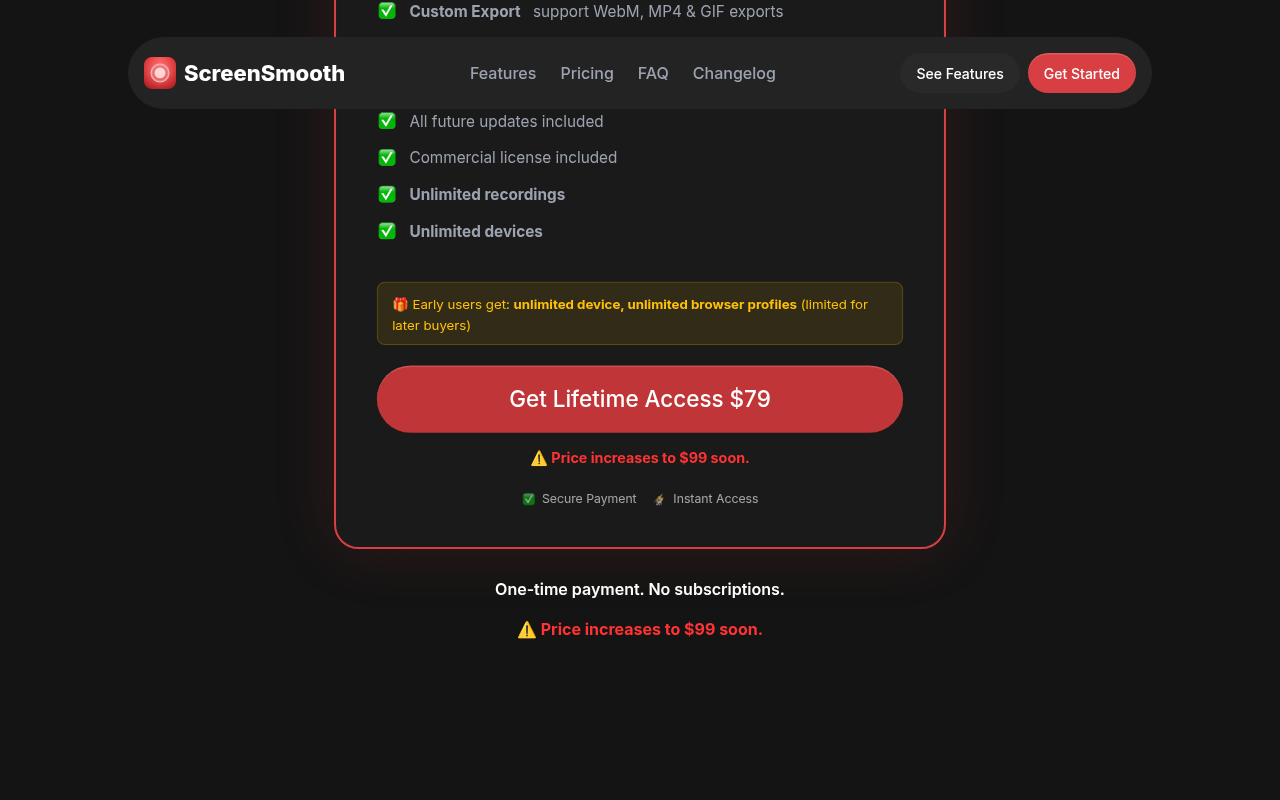
Try it: Open screensmooth.com/#pricing and compare the price ladder with the paragraph below it. Then click "Get Lifetime Access $79" and read the product name on the Creem checkout.
The setup page promises a .zip file but opens the Chrome Web Store
Customers who just paid follow install instructions that describe a download they never get.
Step 1 on /newuser says "You will receive a .zip file containing the extension," but the "Download Extension" button opens the ScreenSmooth listing on the Chrome Web Store, where the button says "Add to Chrome." Nothing downloads. A buyer meets this at onboarding, right after paying, and has to work out for themselves that the store listing replaces the file the page described.
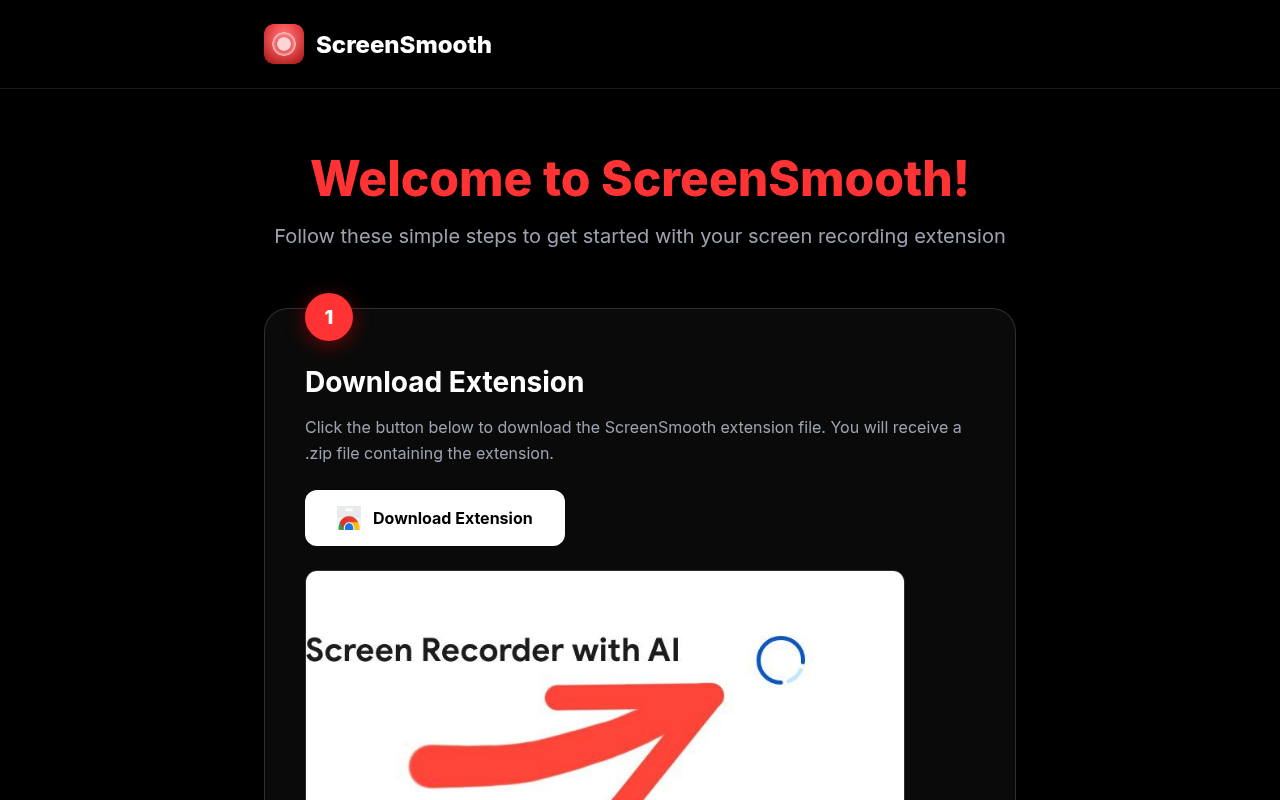
Try it: Open https://screensmooth.com/newuser and read Step 1, then click "Download Extension". A Chrome Web Store listing opens and no .zip file downloads.
The hero's "5/5 on Chrome Web Store" rests on a single rating
Buyers who check the store before paying $79 find one rating and 63 users behind the headline rating.
The home page hero shows five stars and "5/5 on Chrome Web Store" directly above the "Get Lifetime $79" button. The store listing shows "5.0 (1 rating)" and "63 users", so a buyer who checks the claim before paying learns that one review produced the score. The testimonial cards below the hero repeat, and four of their avatar images return 404 from pbs.twimg.com.
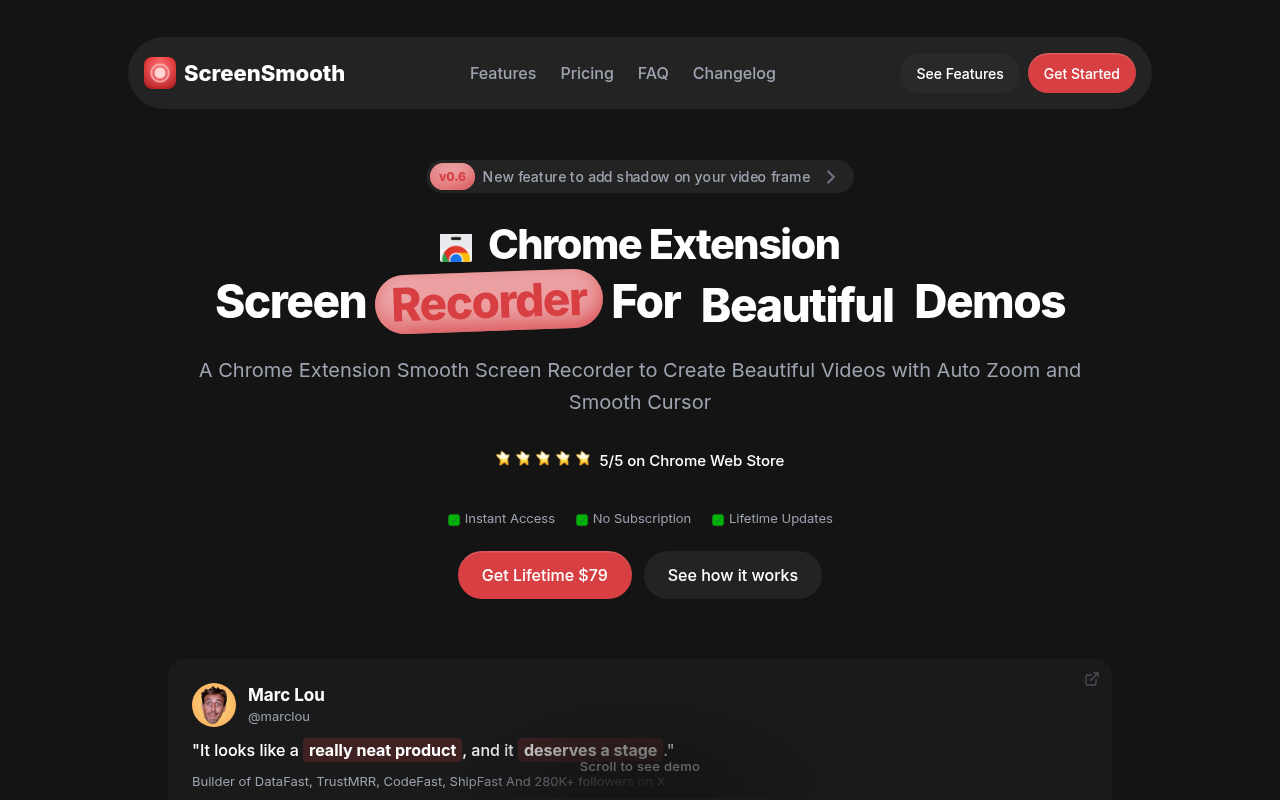
Try it: Open https://screensmooth.com/ and read the rating line above "Get Lifetime $79". Then open the Chrome Web Store listing linked from /newuser and read the rating count.
The Screen Studio comparison page scrolls sideways on phones
Phone visitors comparing ScreenSmooth with Screen Studio see a nav bar cut off at the right edge and a page that slides sideways as they read.
On a 390px phone screen, /vs-screen-studio is 552px wide, so the page slides sideways. Two elements run past the screen edge: the top nav bar, whose right end is cut off in every screenshot, and a "key-diff" card in the comparison section. Visitors meet this on a page meant to help them choose ScreenSmooth over Screen Studio.
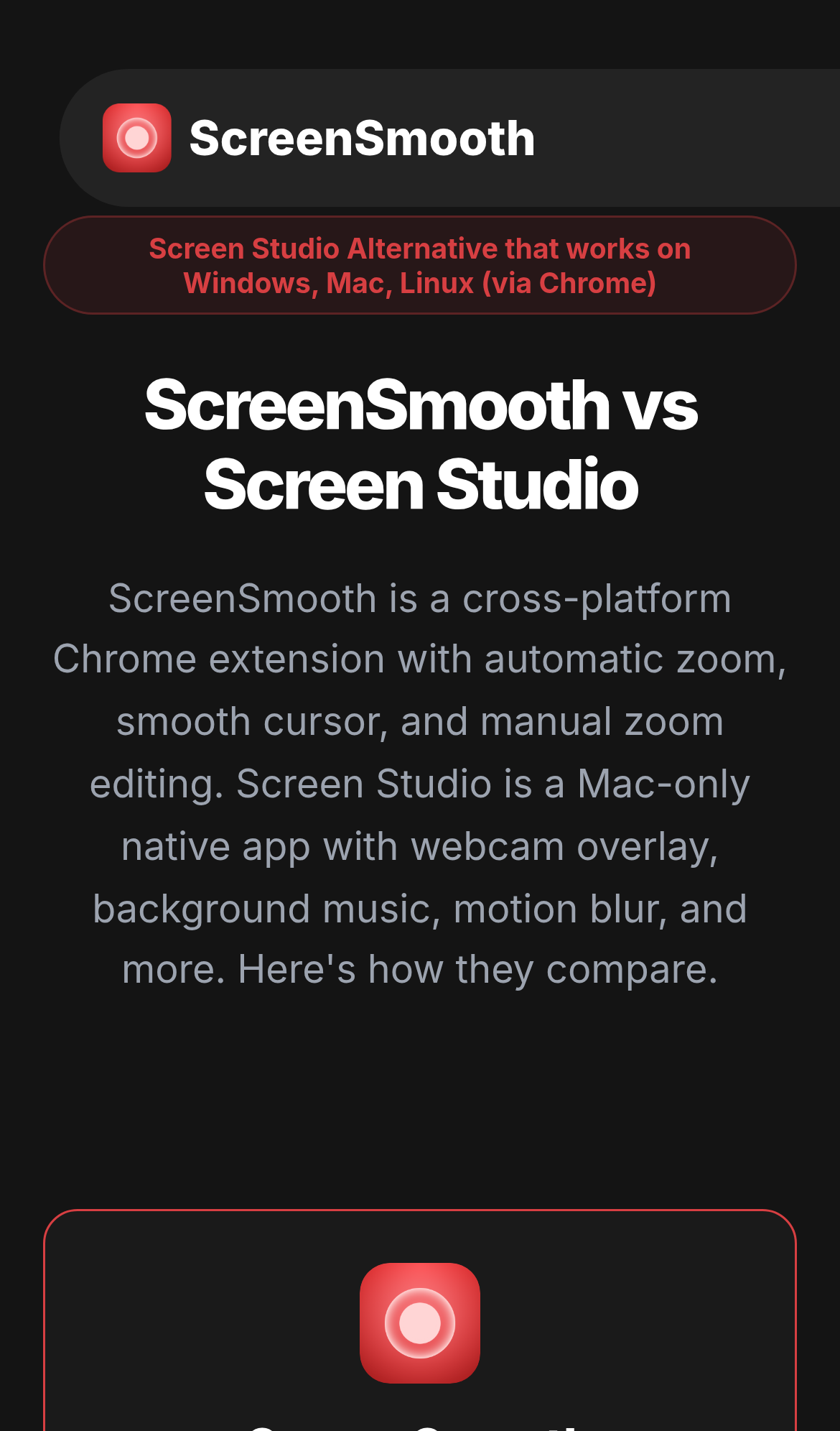
Try it: Open /vs-screen-studio at 390px width in a phone emulator. The nav bar is cut off on the right, and the page scrolls sideways when you swipe left.
The Screen Studio comparison page scrolls sideways on phones
On /screen-studio-alternative at a 390px phone width, the page content measures 417px wide, so the page scrolls sideways. The overflow comes from a card in the features grid (div.rec-pick-grid). The card is 396px wide and starts 20px from the left, and its heading and list lines run past the right edge of the screen.
The bitrate calculator's quality buttons take 1.8s to respond on phones
Tapping the active quality preset button on /free-tools/video-bitrate-calculator took 1768ms to paint a response on a phone viewport. Google classes anything above 500ms as poor. The calculator still shows its bitrate and file size, but until it repaints the tap looks like it did nothing.
Home page icons ship far larger than they display
On the home page, the Chrome logo in the headline is a 2356x2048 file of about 226 KB that displays at 32x28. The nav logo is a 512x512 file of about 197 KB that displays at 32x32, and the star rating GIF is about 125 KB for a 16x16 icon. Largest contentful paint was 500 ms, so visitors do not see a delay.
The home page has no social preview or canonical tags
The head of the home page at / has no canonical link, no og:title, og:description or og:image, and no twitter:card. The page title, meta description and favicon are present, so search listings still have text. Only link previews on social and chat platforms lose their chosen image and copy.
The hero Chrome logo and rating stars have no alt text
The Chrome logo (./assets/logos/chrome.png) beside the home page headline and the star GIFs beside "5/5 on Chrome Web Store" have no alt attribute. The same markup appears on the comparison, changelog and tools pages. The text next to each image carries the same meaning, so screen reader visitors still get the information.
The bitrate calculator's duration inputs have no labels
On /free-tools/video-bitrate-calculator, the duration inputs #durationMin and #durationSec have no label element, aria-label or aria-labelledby. The visible "DURATION", "min" and "sec" text is not tied to the fields, so assistive technology announces them without a name. The page is a free tool outside the purchase path.
The bitrate calculator's resolution and frame rate menus have no label
The visible "RESOLUTION" and "FRAME RATE (FPS)" captions are not tied to the controls, so assistive technology announces two unnamed menus.
Probie fixes this for you.
Stop customers hitting the same friction. Connect your codebase and Probie reproduces these failures, tests the fix, and opens a pull request for your review.
Sign up and get this fixedFree inspection
What should Probie inspect next?
Enter a project URL. There is nothing to install.
Probie checks every issue twice, respects robots.txt, and backs off at bot challenges.
Enter an address and we will email the report card link.