We found 2 issuescosting you truston gsweep.com.
Contact and pricing links open an old project with a placeholder home page.
Watch the inspection.
We navigate your site the way customers would. Idle time is skipped.
How the composite score works
The overall score is a weighted average of the categories: Getting the product 40%, Trust before buying 20%, Mobile 15%, Speed 15%, and Polish and audit 10%. It is never more than 10 points above the Getting the product score, because a product a visitor cannot get cannot score well on anything else, and never more than 25 points above the weakest category, so one badly broken area is not averaged away. Any issue in the main list caps it at 89, so a score above 90 means nothing worth fixing was found.
Each category starts at 100 and stays there when nothing was found in it, whether or not the inspection got that far. Each distinct verified finding deducts 60 points for a serious problem on the path from arriving to paying, 40 for another serious problem, 30, 15 or 8 by high, medium or low severity otherwise, and 4 for an audit finding. Each additional finding below the list takes 2 more points off the overall score, up to 10. Scores stop at zero and round to whole numbers. The formula is fixed and versioned, so the same saved evidence always receives the same score.
Contact and pricing links open an old project with a placeholder home page
Visitors checking contact or pricing details before they grant Gmail access end up on an unfinished-looking second project that has no install button.
The top-nav Contact link and the footer "Pricing page" link both open pages in an older purple design with a different logo, nav and footer. On those pages, Home leads to /home/ instead of the real home page. That page is headed "HomePage Gsweep", repeats the same testimonials and has no Add to Gmail button. A buyer weighing whether to trust the add-on with their Gmail sees what looks like an abandoned second project and has no clear way back to install.
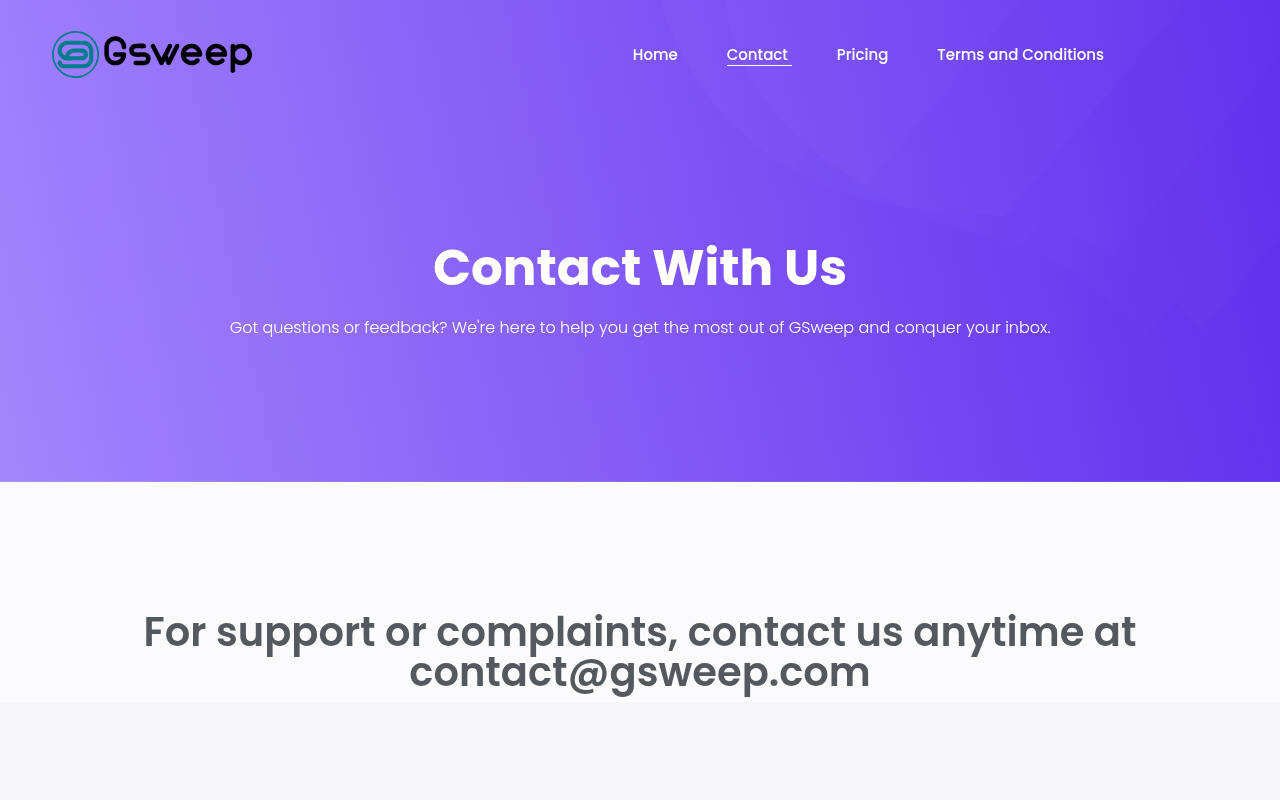
Try it: Open https://gsweep.com/, click Contact in the top nav, then click Home. You land on /home/ headed "HomePage Gsweep" with no Add to Gmail button.
The old /pricing/ page sells rule types that Free already includes
Visitors who compare plans on /pricing/ get a different account of what Free includes and what Pro adds than the home page and guide give them.
The home page footer links to /pricing/, an older page that describes Free only as "Limited Filters: Set a few essential rules to get started" and "basic email organization". It never mentions the 3-filter limit, and it lists "Advanced Automation: Leverage all powerful rule types" as a Pro feature. The guide says "Free gives you 3 filters with everything else included. Pro removes the limit", so a buyer at the pricing step cannot tell what Pro actually adds. The "Go Annual & Save" and "Monthly Flexibility" buttons on /pricing/ open the Marketplace install page, and nothing on the page explains that payment happens later through Upgrade inside Gmail.
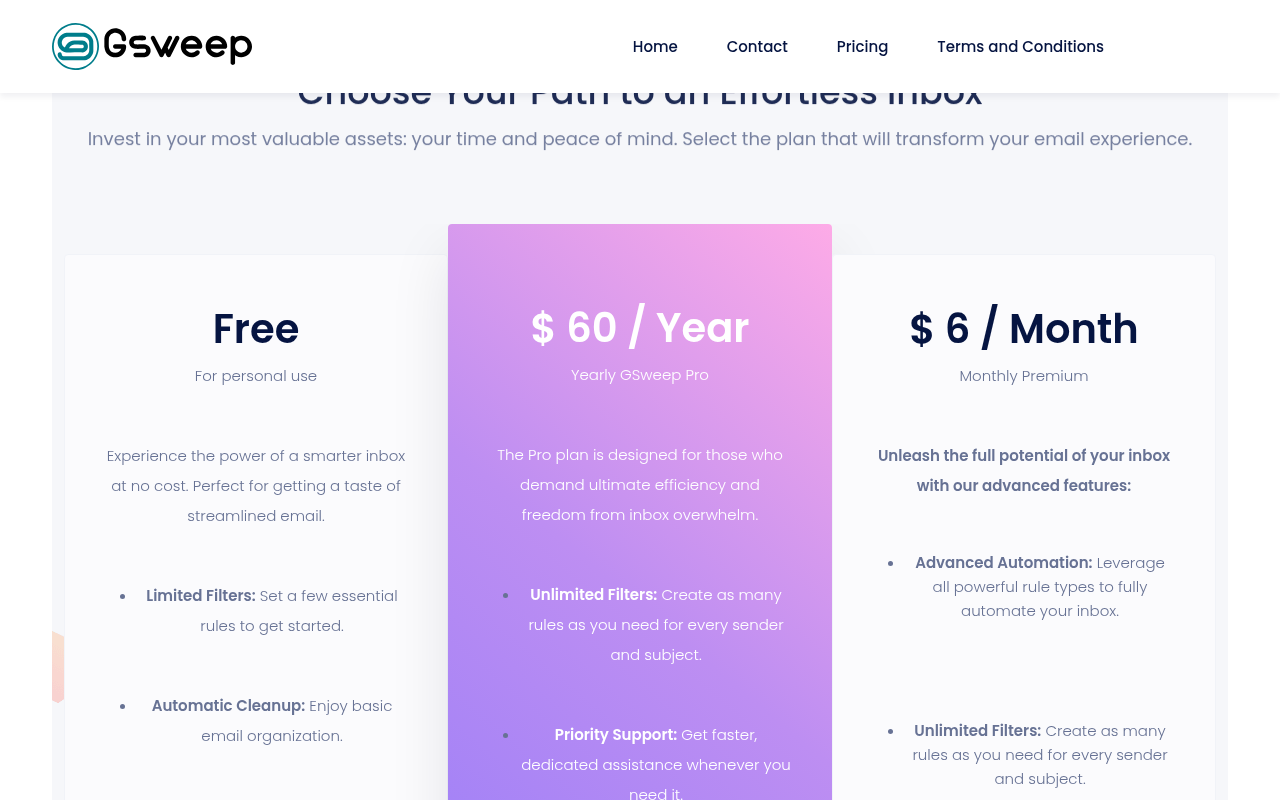
Try it: Open gsweep.com, click "Pricing page" in the footer, and compare the Free and Pro bullets on /pricing/ with the home page Pricing section and the guide's "Upgrade to Pro" step.
The /home/ page throws a script error on load
The /home/ page throws an uncaught error, "Cannot read properties of null (reading 'url')", when it loads, and it does so on every fresh load. The hero, product copy and Add to Gmail button still render, so the error has no visible effect on the page.
The home page has no Open Graph image for link previews
The home page head has no og:image tag. It does declare twitter:card as "summary_large_image" along with an Open Graph title and description. Links to gsweep.com shared in social posts or chat therefore show no preview image.
The home page is missing six security response headers
The response from https://gsweep.com/ is missing Strict-Transport-Security, Content-Security-Policy, CSP frame-ancestors or X-Frame-Options, X-Content-Type-Options: nosniff, Referrer-Policy, and Cross-Origin-Resource-Policy.
The contact email link has slightly low contrast
The [email protected] link uses #1a73e8 text on a #f4f6fa background, which measures 4.16:1. WCAG AA requires 4.5:1 for 16px normal-weight text. The same link appears on the home, guide, pricing and contact pages.
The inline Gsweep link is set apart from its text by color alone
The inline "Gsweep" link (href //gsweep.com) on /home/, /pricing/, /contact-us/ and the legal pages has no underline. Its color, #5e2ced, has a contrast of only 1.51:1 against the surrounding #6a7695 text, and the rule requires 3:1. Visitors who cannot tell those colors apart see plain text where the link is.
Probie fixes this for you.
Stop customers hitting the same friction. Connect your codebase and Probie reproduces these failures, tests the fix, and opens a pull request for your review.
Sign up and get this fixedFree inspection
What should Probie inspect next?
Enter a project URL. There is nothing to install.
Probie checks every issue twice, respects robots.txt, and backs off at bot challenges.
Enter an address and we will email the report card link.