We found 1 issuecosting you saleson rustgis.app.
Watch the inspection.
We navigate your site the way customers would. Idle time is skipped.
How the composite score works
The overall score is a weighted average of the categories: Getting the product 40%, Trust before buying 20%, Mobile 15%, Speed 15%, and Polish and audit 10%. It is never more than 10 points above the Getting the product score, because a product a visitor cannot get cannot score well on anything else, and never more than 25 points above the weakest category, so one badly broken area is not averaged away. Any issue in the main list caps it at 89, so a score above 90 means nothing worth fixing was found.
Each category starts at 100 and stays there when nothing was found in it, whether or not the inspection got that far. Each distinct verified finding deducts 60 points for a serious problem on the path from arriving to paying, 40 for another serious problem, 30, 15 or 8 by high, medium or low severity otherwise, and 4 for an audit finding. Each additional finding below the list takes 2 more points off the overall score, up to 10. Scores stop at zero and round to whole numbers. The formula is fixed and versioned, so the same saved evidence always receives the same score.
The browser app shows no map on a phone, only oversized buttons
Visitors on a phone who tap "Try it in your browser" cannot see or use the sample map.
On a 390 px wide iPhone screen, web.rustgis.app draws its interface about three times too large. The Project button is roughly 200 CSS px wide here and about 65 px on desktop, and the screen holds only the title bar, the Project and Home tabs, the Pan button, a cut-off "Bookm" button, the Layers heading and the scale box "1:88,312,391", with no World Atlas map. A phone visitor meets this at the try step, right after the home page's main button, and the project offers no other way to try the product on a phone.
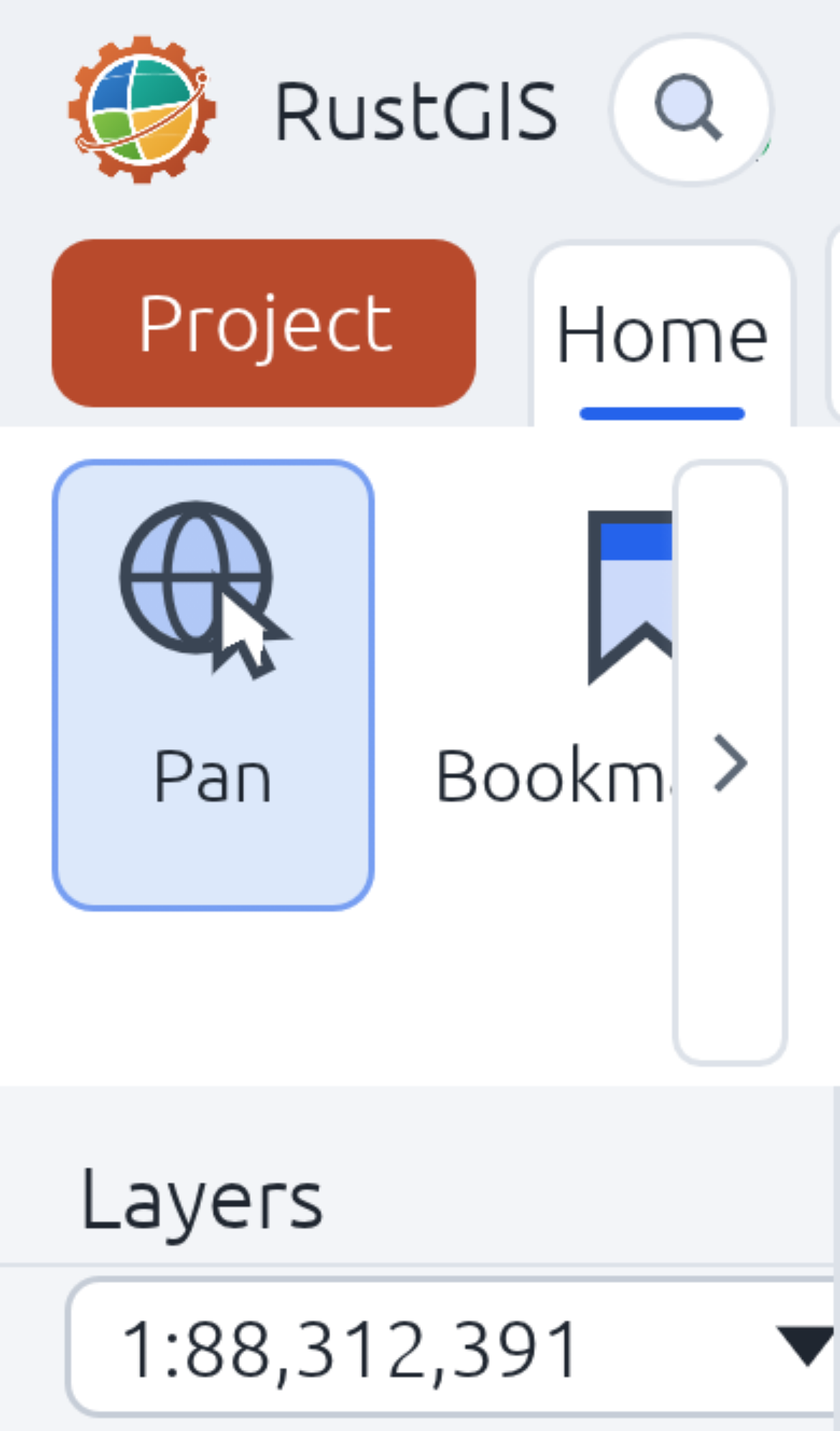
Try it: Open https://web.rustgis.app/ in iPhone emulation (390x664) or on a real iPhone. You will see giant ribbon buttons and the scale box but no map, and scrolling does not change that.
Focused contents links are hidden behind the hero image on mobile
At a 390px width, the home page's table-of-contents links "Highlights" and "A tour" can take keyboard focus, but every probe point inside them hits the article's product screenshot instead. The crop of that region shows only the screenshot, with no visible focused link. This affects keyboard navigation only and does not get in the way of the Try or Download buttons.
Focused table-of-contents links are hidden under the table on mobile
On /architecture/ at phone width, the secondary navigation links "Everything is a command" and "Never crash" take keyboard focus, but every hit-test point inside them lands on a table cell from the layer table. The focus ring sits under the page content, so a keyboard user cannot see which link is active. The page is contributor documentation and does not sit on the path to trying or installing the app.
The home page has no Open Graph or Twitter card tags
The head of the home page has no og:title, og:description, og:image or twitter:card tags. It does have a page title, a meta description, a working favicon and a canonical URL, so search listings are fine, but social link previews have no image or card.
The home page is missing six security response headers
The response from https://rustgis.app/ is missing Strict-Transport-Security, Content-Security-Policy, CSP frame-ancestors or X-Frame-Options, X-Content-Type-Options: nosniff, Referrer-Policy, and Cross-Origin-Resource-Policy.
The "Try it in your browser" button fails contrast at 2.77:1
On the home page, the "Try it in your browser" button uses white bold 13px text on #ff6e42, which measures 2.77:1 against a required 4.5:1. The orange inline links, such as "Data", are at the same 2.77:1 on white, and the active "Home" nav item is at 3.75:1. A low-vision visitor deciding whether to try the web app meets the weakest of these on the primary button.
Probie fixes this for you.
Stop customers hitting the same friction. Connect your codebase and Probie reproduces these failures, tests the fix, and opens a pull request for your review.
Sign up and get this fixedFree inspection
What should Probie inspect next?
Enter a project URL. There is nothing to install.
Probie checks every issue twice, respects robots.txt, and backs off at bot challenges.
Enter an address and we will email the report card link.